




New Trade Zone
Trade Zone is now live
Use the new Trade Zone for auctions and instant-price trades so Pokemon and item offers are easy to find.


Howieeh
Registered User
-
Joined
-
Last visited
Everything posted by Howieeh
-
2.5m
-
900k
-
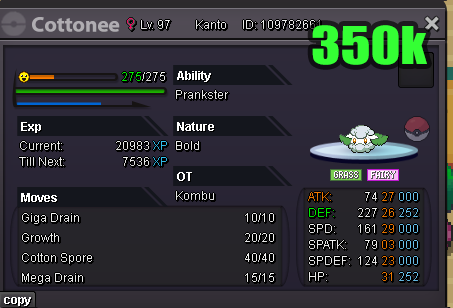
1.5m cottoneehi! i still have a magic mirrorhi i will be on my alt (Rit) to collect the scizor once i get home from work!i wtb this cottonee
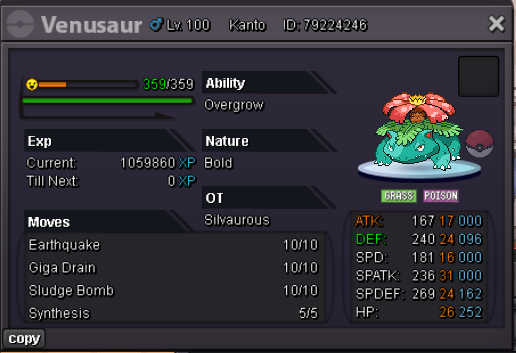
 i wtb this venu
 getting on now if you’re still online1.8m700k420kwhich server you in gold or silverthe wings? which one? i only have red, purple, and pink1.2m

.png.8239df97bb470e629f9d8a7d1b34ffdf.png)

.png.d5de934dfe05a2d3c35e22069d7d7a9a.png)
.png.a65f45fd190827cf9040cf6c4041ccc7.png)
.png.58a21881be5230ae50710a2796a9e828.png)
.png.d383b890038f1a3f60aa467235d05298.png)
.png.2c4dd73bef68eb78a916b37a11c730ab.png)
.png.e4723f5b02f42537f64663bbb6a28a6a.png)
.png.fa8cd5651358c22e009e111f8d70b770.png)
.png.9a12f7d74144da8112d386c0f8ad7322.png)
Account
Navigation
Search
Configure browser push notifications
Chrome (Android)
- Tap the lock icon next to the address bar.
- Tap Permissions → Notifications.
- Adjust your preference.
Chrome (Desktop)
- Click the padlock icon in the address bar.
- Select Site settings.
- Find Notifications and adjust your preference.
Safari (iOS 16.4+)
- Ensure the site is installed via Add to Home Screen.
- Open Settings App → Notifications.
- Find your app name and adjust your preference.
Safari (macOS)
- Go to Safari → Preferences.
- Click the Websites tab.
- Select Notifications in the sidebar.
- Find this website and adjust your preference.
Edge (Android)
- Tap the lock icon next to the address bar.
- Tap Permissions.
- Find Notifications and adjust your preference.
Edge (Desktop)
- Click the padlock icon in the address bar.
- Click Permissions for this site.
- Find Notifications and adjust your preference.
Firefox (Android)
- Go to Settings → Site permissions.
- Tap Notifications.
- Find this site in the list and adjust your preference.
Firefox (Desktop)
- Open Firefox Settings.
- Search for Notifications.
- Find this site in the list and adjust your preference.