




New Trade Zone
Trade Zone is now live
Use the new Trade Zone for auctions and instant-price trades so Pokemon and item offers are easy to find.


Yannchii
Registered User
-
Joined
-
Last visited
-
Thank you for informing me this was very helpful!
-
Yannchii changed their profile photo
-
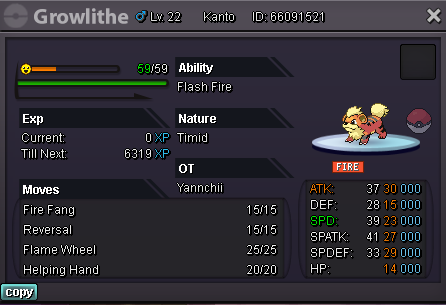
Hello everyone, I've recently been hunting for growlithes to use for my team in the story mode for Kanto. I'm new to the game so I would appreciate an opinion of an experienced player on whether or not I should keep it or not, thank you. Have a good time!
-
So far I'm at viridian forest looking for a pikachu with lightball, if I catch the pikachu could it possibly include a lightball? Or do I need a pokemon with compound eyes and the ability theif to get the light ball?