




New Trade Zone
Trade Zone is now live
Use the new Trade Zone for auctions and instant-price trades so Pokemon and item offers are easy to find.


Xaizen
Registered User
-
Joined
-
Last visited
Everything posted by Xaizen
-
500k
-
I’m online for a bit if you can come
-
Let me know about the jolly one. 🙂
-
600k each for Adamant and Naive. S.o. Jolly
-
start adamant 300k and naive 500k
-
1m
-
Confirmed 100k start
-
Won't help as it is still in Rate/Price Check and not in Selling ..
-
c/o is 20m but this is not the right place for bids as it's in the wrong topic then. Maybe a Mod can move it and I'll make an auction?
-
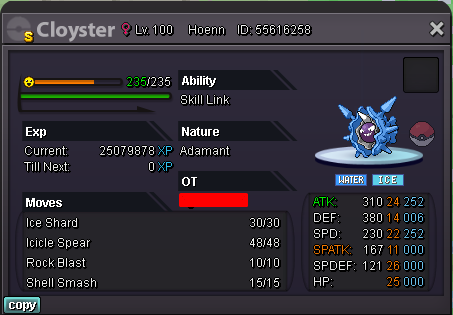
Greetings trainers, can you help me with a price check on this lovely Cloyster? Thanks.
-
Hello guys. At the moment there is Komala worldquest ongoing so I went Route 14 for a hunt. In my first position I have Alakazam with Trick and Thief. Ditto copied me and used either trick or thief and removed my item (Leftovers). I switched out to Breloom for false swipe and guess what... After the battle I noticed my toxic orb and leftovers were gone. Ditto on my pc doesn't have the orb. Also its not on my poke neither in my bag. I restarted the game but it's gone. What can I do? I thought it's not possible to lose items to wild pokes as it's only an in-battle sequence. Edit: Ditto used trick on my Breloom and got my toxic orb. I used false swipe before it used trick. So it was 1 HP and got poisoned and faint.
-
550k
-
200k
-
Starting

