




New Trade Zone
Trade Zone is now live
Use the new Trade Zone for auctions and instant-price trades so Pokemon and item offers are easy to find.

Flaggpunsch
Registered User
-
Joined
-
Last visited
Everything posted by Flaggpunsch
-
eldoroty98 bids 500k on impish scizor
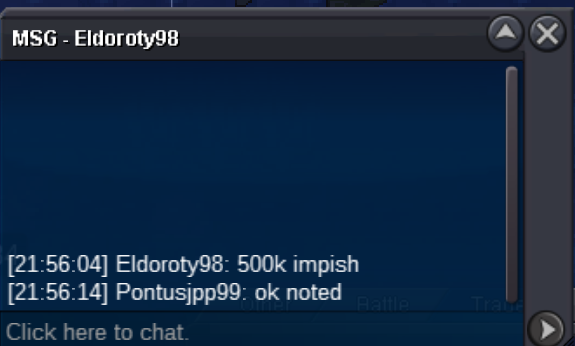
-
300k on chesnaught by julian888

-
Ortegajd bids 400k for impish sc izor and 300k for 27 attack adamant scizor

-
Eetaachee starts all Scizors

-
Starting price for impish scizor: 300k// c.o 1m by ortegajd AUCTION ENDED Starting price for adamant scizors: 200k// 22 attack adamant scizor c.o 500k by Kharnna AUCTION ENDED 27 attack adamant szicor c.o 800k by Vito007 AUCTION ENDED Starting price for Chesnaught: 200k// c.o 2 million 300k by Gdarch AUCTION ENDED Min raise on all: 100k Auction end 24 after start No insta I accept cc at 420k Chesnaught Timer: https://www.tickcounter.com/countdown/4371271/chestnaught Timer for all Scizors: https://www.tickcounter.com/countdown/4371290/scizors
.png.1e6027b7ca9bf63d7419403583a2e968.png)
.png.4fc88e8b15d68e8ebec0adb91658938c.png)
.png.7d1a29f05a1acc774e3c6dfe1a089a01.png)
.png.e6a17c1a0494a9f213f2bb0442478b7d.png)
-
auction won by k4neki 1,13m1 million 30k by Harshmager/Benjiemager
 bumpStarting Price: 400k Min Raise: 100k Current offer: 1 million and 130k by K4neki Auction End 24h after start i accept cc at 440k https://www.tickcounter.com/countdown/4367353/my-countdown Insta: 5m
 1legend1 won the auction for 1.4 million, log in game to complete the auctionYour bid was submited when it was 1 minute left, therefore another 15 minutes have been added, so not yet 🙂Start: 800k Won Bid 1.4M by 1legend1 Min Raise: 100k No Insta I accept cc (380k) and pokédollars
 bumpCloseauction won by starfruit, pls contact me ingame Pontusjpp99bump450k by starfruit
.png.84417448c6c43a1bbe6d58ddff3db5dd.png) Starting Offer: 350k Current Offer: 450k by starfruit Min bid: 50k No Insta Auction end 24h after start The auction is both forum and in-game I accept cc (390k) and Pokédollars https://www.tickcounter.com/countdown/3438151/salamance
Starting Offer: 350k Current Offer: 450k by starfruit Min bid: 50k No Insta Auction end 24h after start The auction is both forum and in-game I accept cc (390k) and Pokédollars https://www.tickcounter.com/countdown/3438151/salamance.png.b76c066a0155540e19de43de8ba9c0cc.png)


.png.ef2224b10229bbec9795d0878ddafdcb.png)
.png.bb15b74b9e9aca9e162c30d837c63c81.png)
Account
Navigation
Search
Configure browser push notifications
Chrome (Android)
- Tap the lock icon next to the address bar.
- Tap Permissions → Notifications.
- Adjust your preference.
Chrome (Desktop)
- Click the padlock icon in the address bar.
- Select Site settings.
- Find Notifications and adjust your preference.
Safari (iOS 16.4+)
- Ensure the site is installed via Add to Home Screen.
- Open Settings App → Notifications.
- Find your app name and adjust your preference.
Safari (macOS)
- Go to Safari → Preferences.
- Click the Websites tab.
- Select Notifications in the sidebar.
- Find this website and adjust your preference.
Edge (Android)
- Tap the lock icon next to the address bar.
- Tap Permissions.
- Find Notifications and adjust your preference.
Edge (Desktop)
- Click the padlock icon in the address bar.
- Click Permissions for this site.
- Find Notifications and adjust your preference.
Firefox (Android)
- Go to Settings → Site permissions.
- Tap Notifications.
- Find this site in the list and adjust your preference.
Firefox (Desktop)
- Open Firefox Settings.
- Search for Notifications.
- Find this site in the list and adjust your preference.