




New Trade Zone
Trade Zone is now live
Use the new Trade Zone for auctions and instant-price trades so Pokemon and item offers are easy to find.

Shanksd
Registered User
-
Joined
-
Last visited
-
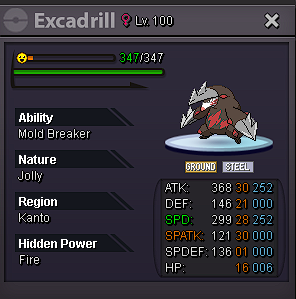
Auction on excadrill ended and the winner is @Royalboss with 550k offer. We can meet in game for the trade. Thanks everyone for participating.
-
auction on excadrill ends in 3hours and 42 minutes. bump
-
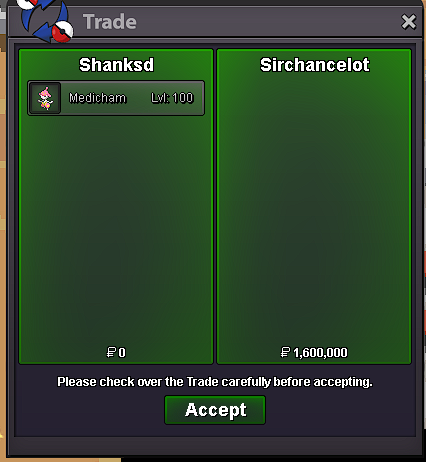
medicham trade completed
-
Medicham auction ended and the winner is @Sirchancelot with 1.6m we can meet in game for the trade. Excadrill auction goes on with remaining time at 24hours and 45minutes.
-
the rules say that at the last 15minutes everytime a bid happens the 15minute time ressets so the offer is 1.6m and 15 minutes left to go
-
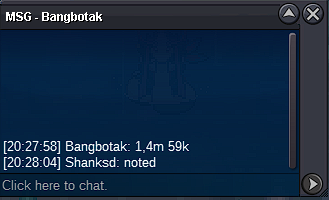
c.o 1.4m 59k on medi 15minutes to go
-
c.o 1.2m by Pilek 15minutes remaining

-
24minutes left on medicham
-
c.o 969k on medi

-
c.o 859k by Bangbotak

-
800k is not a valid bid cause last bid is 751k. Min bid is 50k so you have to bid as 801k sorry for correcting just to avoid mistakes
-
Bump 5 hours left
-
-
S.O 600k Min bid 50k no insta ends 48h after first bid accepted payment methods gold or cc=380k auction on medicham ended poke sold for 1.6m S.O 500k Min bid 50k no insta ends 48h after first bid accept payment methods gold or cc=380k

-
