New Trade Zone
Trade Zone is now live
Use the new Trade Zone for auctions and instant-price trades so Pokemon and item offers are easy to find.

Hashi07
Registered User
-
Joined
-
Last visited
Everything posted by Hashi07
-
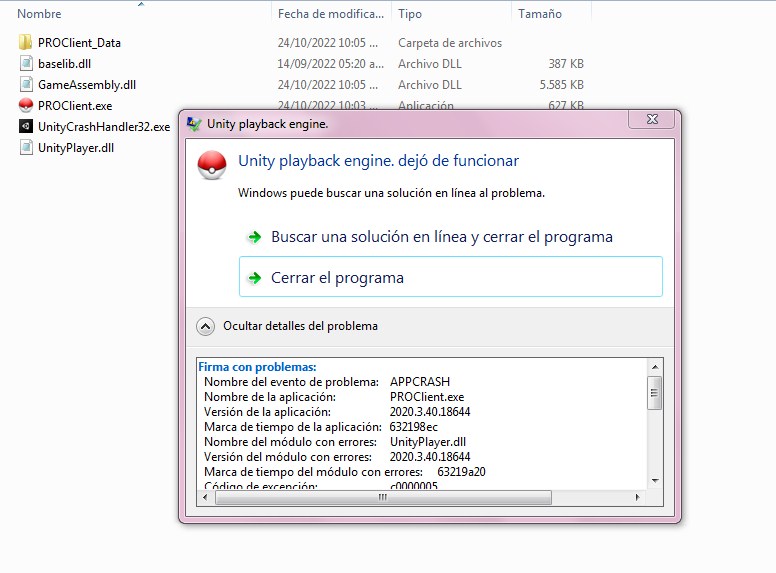
I have the same problem and they deleted the post where I reported that 😞
-
Nombre del evento de problema: APPCRASH Nombre de la aplicación: PROClient.exe Versión de la aplicación: 2020.3.40.18644 Marca de tiempo de la aplicación: 632198ec Nombre del módulo con errores: UnityPlayer.dll Versión del módulo con errores: 2020.3.40.18644 Marca de tiempo del módulo con errores: 63219a20 Código de excepción: c0000005 Desplazamiento de excepción: 003796ce Versión del sistema operativo: 6.1.7600.2.1.0.256.1 Id. de configuración regional: 8202 Información adicional 1: 0a9e Información adicional 2: 0a9e372d3b4ad19135b953a78882e789 Información adicional 3: 0a9e Información adicional 4: 0a9e372d3b4ad19135b953a78882e789
-
I already caught youHello Shinohara, look I downloaded the new client and even so it does not open, here I give you the capture of the files that I have, if you realize in the new client they only changed files but the Unityplayer.dll is still the same as the one I had previous customer
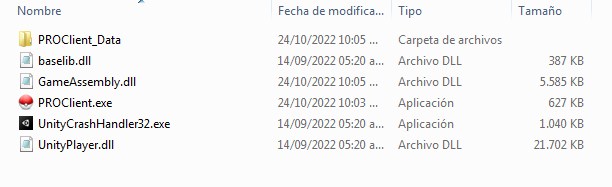 I have the same problem, the Windows 32bits Proclient doesn't open either, an error comes out, it says it's because of UnityPlayer.dll, that's why I'd like you to check that client well to see what the problem is. please and thank you