




New Trade Zone
Trade Zone is now live
Use the new Trade Zone for auctions and instant-price trades so Pokemon and item offers are easy to find.

Sazesone
Registered User
-
Joined
-
Last visited
-
Trade completed. Thanks all, have a great day.

-
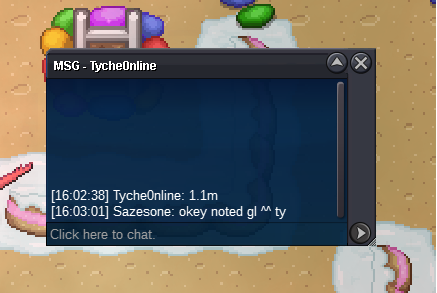
Auction end , winner is @Tyche0nline . Please contact me discord or in game. Thank you all, good luck and great day for all. ^^
-
c.o 1.1
-
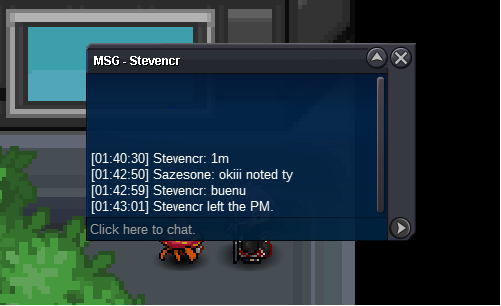
c.o 1m
-
Yeah, thanks to explain again Twittertos. By te way, again: Sorry my apologizes for all affecteds, my mistake. Thanks to all and thanks mods for help. GL & HF guys.
-
Okey thank you a lot and sorry again for the missundertanding. First time make an auction.
-
Im srry Herusuno as i told you in game im relativetly newbie. I just play this game since 3-4 weeks ago. I didnt know how this works and i tried to info by a friend but he didnt comunnicate me well about all it works. As i said you a few minutes ago in pm, i found the guy i sold Rotom but he is now offline, as soon he reconnect i will send here some screens proving i sold him by 900k. Sorry by the way my english is not the best and my apologizes for the missunderstood. Have all great day, see you in game .
-
Sazesone changed their profile photo
-
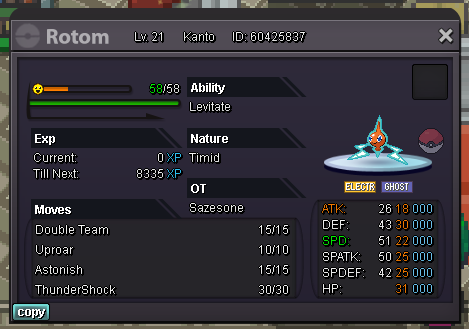
Auction Start Offer : 750k Min Bid : 100k Accept Payments : Pokedollars , CC (360k) , IV RR (650k) No Insta End 72hours After First Bid
-
