




New Trade Zone
Trade Zone is now live
Use the new Trade Zone for auctions and instant-price trades so Pokemon and item offers are easy to find.

Cheesey456
Registered User
-
Joined
-
Last visited
-
yeah there was a typo in that email address so i have created a new topic on the link to request a change of email address thanks for the help it is much apricated
-
i have checked the spam folders but nothing unfortunately.
-
i am having problems trying to recover this account. i am not getting the email to verify new device. i have also tried to change the email address to a diffrent one but still no luck.
-
-
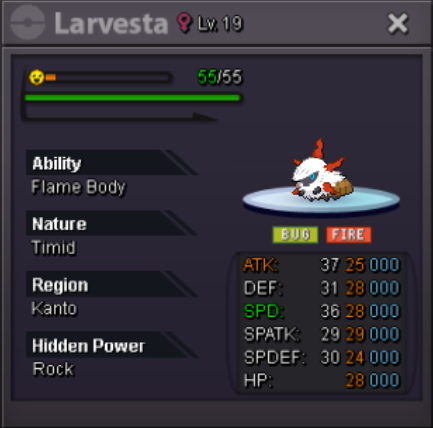
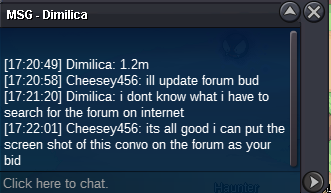
Ended Winner is Dimilica with bid of 1.2 mil will post up trade SS when trade is doneCurrent bid: Dimilica 1.2M Insta buy price 10M Will end on 19th Nov at 6pm UK time Raise 100K I will accept CC as 350k RR as 650k


Account
Navigation
Search
Configure browser push notifications
Chrome (Android)
- Tap the lock icon next to the address bar.
- Tap Permissions → Notifications.
- Adjust your preference.
Chrome (Desktop)
- Click the padlock icon in the address bar.
- Select Site settings.
- Find Notifications and adjust your preference.
Safari (iOS 16.4+)
- Ensure the site is installed via Add to Home Screen.
- Open Settings App → Notifications.
- Find your app name and adjust your preference.
Safari (macOS)
- Go to Safari → Preferences.
- Click the Websites tab.
- Select Notifications in the sidebar.
- Find this website and adjust your preference.
Edge (Android)
- Tap the lock icon next to the address bar.
- Tap Permissions.
- Find Notifications and adjust your preference.
Edge (Desktop)
- Click the padlock icon in the address bar.
- Click Permissions for this site.
- Find Notifications and adjust your preference.
Firefox (Android)
- Go to Settings → Site permissions.
- Tap Notifications.
- Find this site in the list and adjust your preference.
Firefox (Desktop)
- Open Firefox Settings.
- Search for Notifications.
- Find this site in the list and adjust your preference.