




New Trade Zone
Trade Zone is now live
Use the new Trade Zone for auctions and instant-price trades so Pokemon and item offers are easy to find.

Floooooo04
Registered User
-
Joined
-
Last visited
Everything posted by Floooooo04
-
Bump 24hrs left!
-
bumpbumpbumpMin bid is 200kDuration: 70h starting at 22:00 GTM+1 13.11.2024, 15min rule applies Start price: 1m Min Raise: 100k No insta cc and rr Accepted, 1cc = 400k 1rr = 500k Can offer both here or in-game Silver players must organize and guarantee transfer within a week
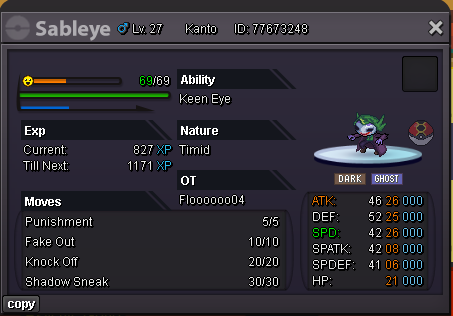 Duration: 70h starting at 22:00 GTM+1 13.11.2024, 15min rule applies Start price: 1m Min Raise: 100k No insta cc and rr Accepted, 1cc = 400k 1rr = 500k Can offer both here or in-game Silver players must organize and guarantee transfer within a week
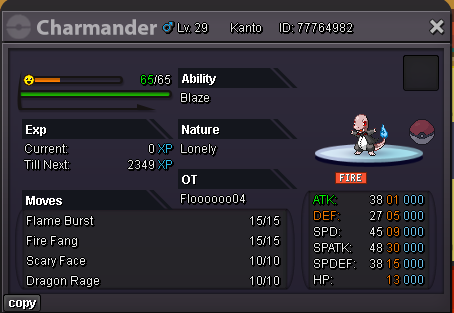 Duration: 70h starting at 22:00 GTM+1 13.11.2024, 15min rule applies Start price: 4m Min Raise: 200k No insta cc and rr Accepted, 1cc = 400k 1rr = 500k Can offer both here or in-game Silver players must organize and guarantee transfer within a week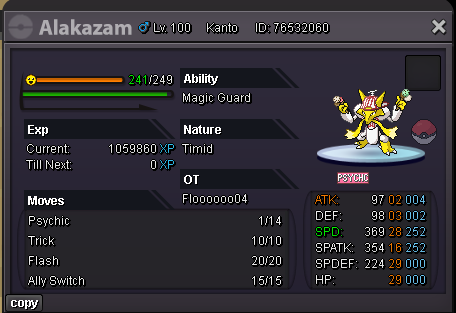
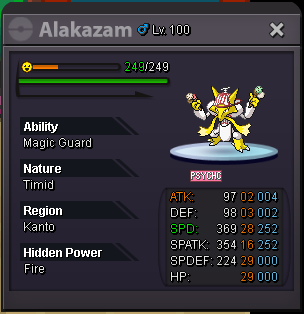 Duration: 72h starting at 20:00 GTM+1 13.11.2024, 15min rule applies Start price: 6m Min Raise: 200k No insta cc and rr Accepted, 1cc = 400k 1rr = 500k Can offer both here or in-game Silver players must organize and guarantee transfer within a week
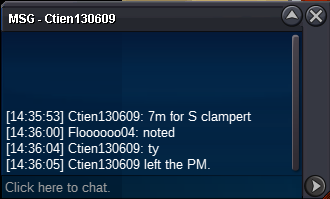
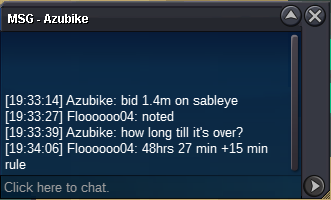
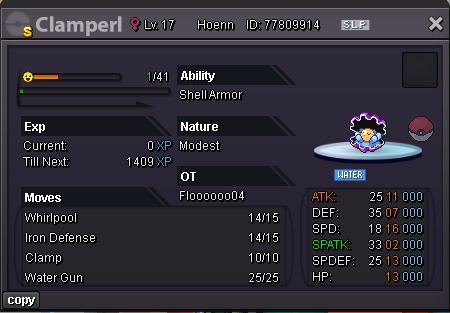 starting offer is 2m(Edited before starting time because posted on accident before finishing the post)Starting offer: 2m Min raise: 200k Starting time: 8:30 10.10.24 gtm+2 Duration 48hrs Accept cc = 440k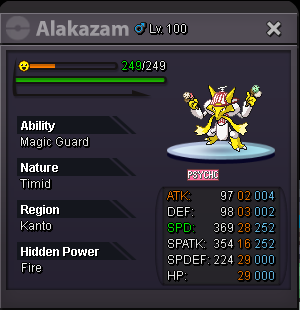


Account
Navigation
Search
Configure browser push notifications
Chrome (Android)
- Tap the lock icon next to the address bar.
- Tap Permissions → Notifications.
- Adjust your preference.
Chrome (Desktop)
- Click the padlock icon in the address bar.
- Select Site settings.
- Find Notifications and adjust your preference.
Safari (iOS 16.4+)
- Ensure the site is installed via Add to Home Screen.
- Open Settings App → Notifications.
- Find your app name and adjust your preference.
Safari (macOS)
- Go to Safari → Preferences.
- Click the Websites tab.
- Select Notifications in the sidebar.
- Find this website and adjust your preference.
Edge (Android)
- Tap the lock icon next to the address bar.
- Tap Permissions.
- Find Notifications and adjust your preference.
Edge (Desktop)
- Click the padlock icon in the address bar.
- Click Permissions for this site.
- Find Notifications and adjust your preference.
Firefox (Android)
- Go to Settings → Site permissions.
- Tap Notifications.
- Find this site in the list and adjust your preference.
Firefox (Desktop)
- Open Firefox Settings.
- Search for Notifications.
- Find this site in the list and adjust your preference.