Skip to content
View in the app

A better way to browse. Learn more.

Pokemon Revolution Online

A full-screen app on your home screen with push notifications, badges and more.

To install this app on iOS and iPadOS
  1. Tap the Share icon in Safari
  2. Scroll the menu and tap Add to Home Screen.
  3. Tap Add in the top-right corner.
To install this app on Android
  1. Tap the 3-dot menu (⋮) in the top-right corner of the browser.
  2. Tap Add to Home screen or Install app.
  3. Confirm by tapping Install.
New Trade Zone
Trade Zone is now live
Use the new Trade Zone for auctions and instant-price trades so Pokemon and item offers are easy to find.
Open Trade Zone

Chuzisuka

Registered User
  • Joined

  • Last visited

About Me

Welcome to Chuzi PokéStore!

Hello trainers! 👋
Welcome to my Pokémon trading shop where you can find a variety of Pokémon suited for every type of player, from competitive battlers to casual story players.

I offer a wide selection of Pokémon including:

⚔️ High Competitive PvP Pokémon

🐉 Boss & Raid Ready Pokémon

🧬 Mid Competitive Pokémon

📖 Story Mode Pokémon

Special & Rare Pokémon
Occasionally, rare or event Pokémon will also be available in limited stock.
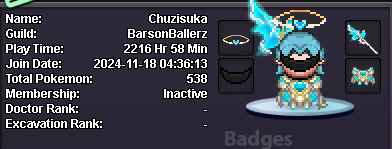
 

Screenshot2026-06-05221950.png.bf4d33ff0d31ba0ad0fe7b7e98b5ec4a.png

Message me in-game IGN; Chuzisuka
 Or reply here on the post
 Or DM me on Discord:
chuzisuka_35697


 Accepted Payment Methods:

 CC (Coin Capsule) equivalent to 470k (₽)
 PokéDollar (₽)

💎 All the price are negotiable💎

tell me which Pokémon you’re interested in, and I’ll get back to you as soon as possible with availability, details, and pricing. Fast replies guaranteed whenever I’m online ⚡


HD-wallpaper-overlord-narberal-anime-doe-gamer-games-girl-nabe-narberal-gamma-overlord-waifu.jpg

Account

Navigation

Search

Search

Configure browser push notifications

Chrome (Android)
  1. Tap the lock icon next to the address bar.
  2. Tap Permissions → Notifications.
  3. Adjust your preference.
Chrome (Desktop)
  1. Click the padlock icon in the address bar.
  2. Select Site settings.
  3. Find Notifications and adjust your preference.