




New Trade Zone
Trade Zone is now live
Use the new Trade Zone for auctions and instant-price trades so Pokemon and item offers are easy to find.

Elfe255
Registered User
-
Joined
-
Last visited
Everything posted by Elfe255
-
Thank you and I'm sorry for my mistake. Since I'm only selling pokémons, I thought it was the right sub-forum. My bad!
-
---------------------------------------------------------------------------------------------------------------------- Contact Info IGN: Elfe255 (Gold) Discord: lastwindwalker Please contact me in game only unless really necessary ---------------------------------------------------------------------------------------------------------------------- Shop Rules 1. Please be respectful with me and everyone else at all time 2. Fake offers will be reported 3. Prices can be negociated within reason 4. I have the right to decline offers 5. Once a sale is completed, there are no refunds or change of mind ----------------------------------------------------------------------------------------------------------------------------------------- Payments - Pokédollars - Coin Capsule = 500k - IV Reroll Ticket = 700k - Nature Reroll ticket = 300k ----------------------------------------------------------------------------------------------------------------------------------------- Regular Pokémons Notice: Sometimes I sell pokémons for my friends so don't worry about the letter after the price. They decide of their prices on their own. Untrained Trained
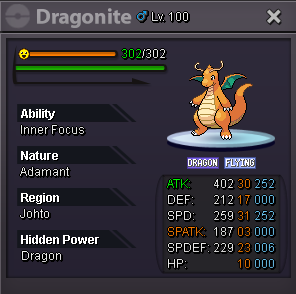
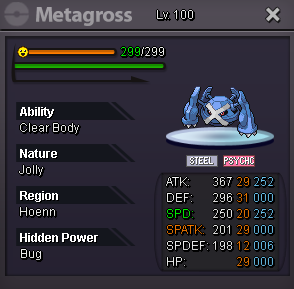
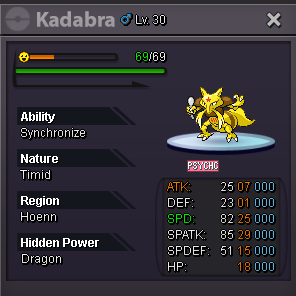
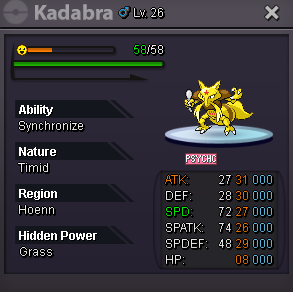
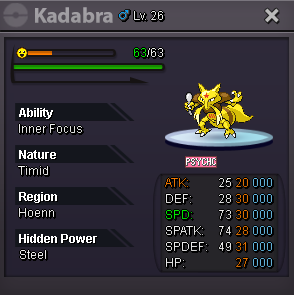
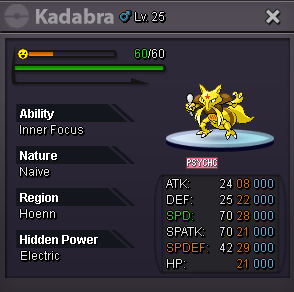
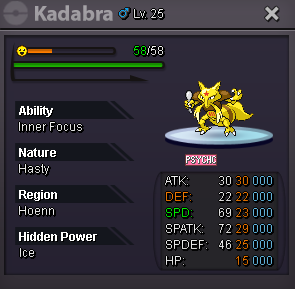
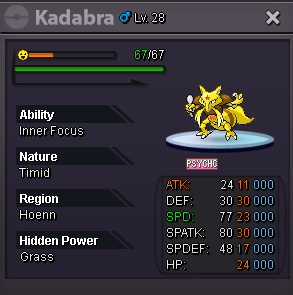
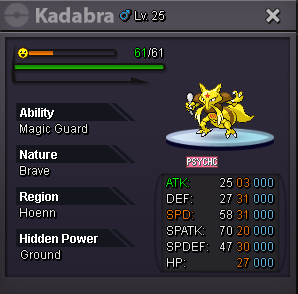
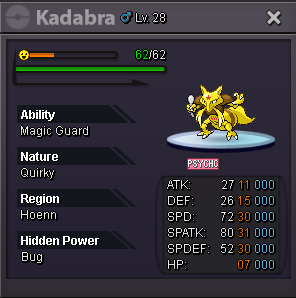
-
300k
-
I offer 500k
