New Trade Zone
Trade Zone is now live
Use the new Trade Zone for auctions and instant-price trades so Pokemon and item offers are easy to find.

Exoexa
Registered User
-
Joined
-
Last visited
Everything posted by Exoexa
-
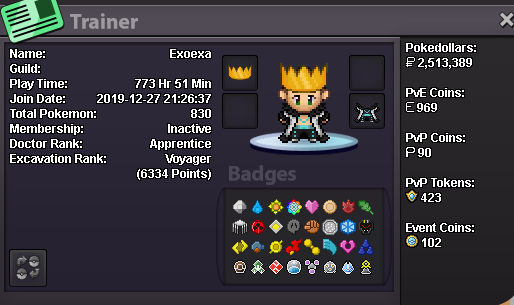
What can you contribute to Dynasty? My next goal is to reach the top 25 in PvP rating norms, and I also enjoy hunting PvP Pokémon and occasionally doing dungeons. With my experience I'm happy to help newer players get into PvP and understand the metagame and help push rating. Outside of Pokémon I play Dark and Darker,R6 and compete in Super Smash Bros. Ultimate (PT main), so I'm always up to be a gaming buddy for other games too. What is your real life and ingame name? My name is Simon, and ingame I go by Exoexa. How old are you and where are you from? I'm 25 and from Germany. Discord tag? How often are you online there? My Discord tag is exoexa, and I'm online on a regular basis. Screenshot of your trainer card: