




New Trade Zone
Trade Zone is now live
Use the new Trade Zone for auctions and instant-price trades so Pokemon and item offers are easy to find.

Xxml4gxx
Registered User
-
Joined
-
Last visited
Everything posted by Xxml4gxx
-
up
-
up
-
no thank u , thats it thanks for ur help ^^
-
up
-
careful one : 150k bold/healer : 150k bold/healer 100k
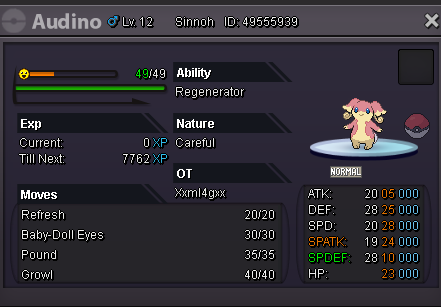
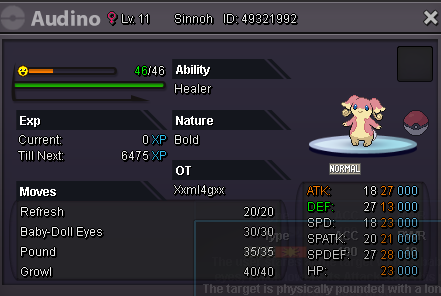
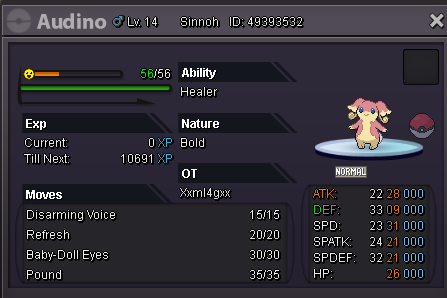
-
ended won by mrlaw by 500k
-
25 mins left
-
Start c.o 500k time 2:08 gmt+2 20/8 end time 2:08 21/8

-
up
-
up
-
-
-
up
-
looking for espurr male / mewostic h.a prefer +20 ivs ability must be own tempoo / prankster
-
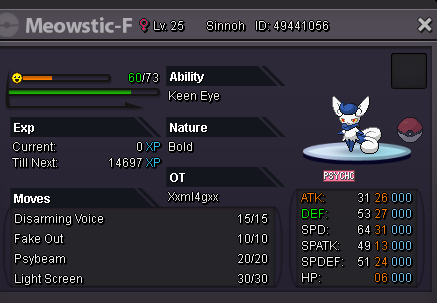
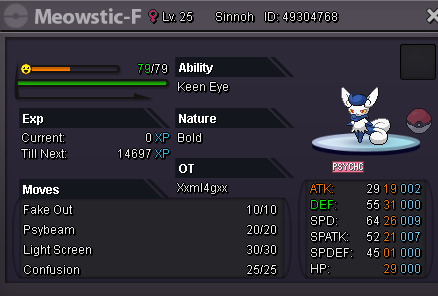
evolved 2 espurr female to mewostic female h.a and both turned into keen eye didn't screen b4 evolving sadly both were h.a ( own tempo )
-
-
changed s.o/ insta
-
up
-
up
-
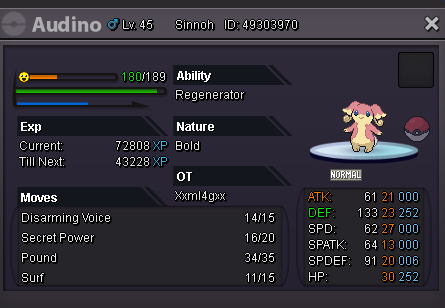
Auction S,o 500k insta 1m min bid 50k accept cc = 380k bms 160k auction for 24hrs from first bid
-
PRO Username: Xxml4gxx Have you looked at the FAQ to solve your issue?: No On which server issue happened: RED What have you done before the problem was there? at route 111 desert i have to fight collecto and get fossil from him , when i did i got fossil then went down to fight a npc , but game rolled back when i relogged i didnt find fossil tryed to find where is collector again to re fight he dissapeard asked gm , said i need to make bug report and admin need to verify it What have you already tried to solve the problem? Description and Message
-
Closed --- Sold
-
cleffa ivs 29-28-29-20-31-26 bold Cute Charm offer for it inta 1m
