




New Trade Zone
Trade Zone is now live
Use the new Trade Zone for auctions and instant-price trades so Pokemon and item offers are easy to find.

Kdao
Suspended
-
Joined
-
Last visited
Everything posted by Kdao
-
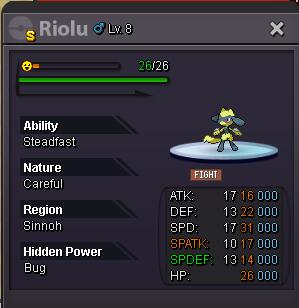
Selling Shiny Riolu Start offer : 15m Raise per offer: 100k Intsa : 50m time: After first offer ,1 week starts. end at dec. 27. 2018 9.31AM CET (gmt+2) Accept cc = 300k I have the right to cancel Auction
-
Hi , may I know where can I rrvive armor fossil ? thank you.
-
trade cancel no offers .
-
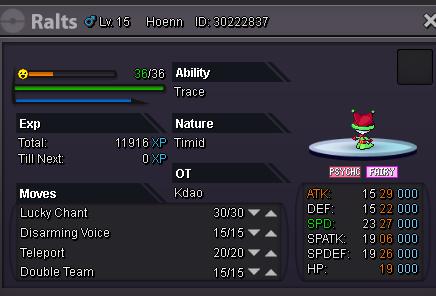
Xmas Ralts Selling at start price 2m , insta 8m ,the offer ends 3days after the first offer . every increase should be 100k add
-
it show me this pokemon really evil , may i know , if this weeks event done . thank you.
-
Hi any one know where to claim the price of evil grinch thank you
-
PLAYER CATEGORY Smartest: Glogs Friendliest: Muzita Funniest: Muzita Coolest: Muzita Comeback Player of the Year: Glogs Most Talkative: Gengar20 Most Trustworthy: Glogs Most Helpful: Gengar20 Most Missed: Kaorii Most Influential: Gengar20 Most Intriguing: Fjabio Most Experienced Player: Gengar20 Best/Funniest Username: Kdao Most Professional Guide Maker: PreHax Most Professional Discord Moderator: ShinyCelebi STAFF CATEGORY Best Mapper: Sprinkz Best Artist: Aeolus Best Community Coordinator: Fluffles Best Moderator: Senrosia Best Trade Moderator: logan Best Game Master: Menrva Best Admin: Shaui Best Staff Username: logan Most Professional Staff: logan Most Dedicated Staff: logan Funniest Staff: logan Friendliest Staff: logan Most Honorable Former Staff: Shary Most Missed Former Staff: Shary
-
cancel my order sorry
-
-
thanks for the reply , my pro just got work again. ithink the error is from my c disc when i restart again windows.just said reparing c drive. so now is fine now . thank you.
-
When I am click to start pro , the pro application does not show anything , i ve try restart and redownload the pro but it still not work , and I check on the task manage pro does not show in Apps , only show in background processess.

-
thanks !! it works now
-
CP - huawei mate 10 When starting a fight the game crashes please help !!
