




New Trade Zone
Trade Zone is now live
Use the new Trade Zone for auctions and instant-price trades so Pokemon and item offers are easy to find.

Mathmachine
Registered User
-
Joined
-
Last visited
Everything posted by Mathmachine
-
Hello, i literally didnt remember what happend to my pokemon, didnt know if i sell it, or delete it, can you find out? thanks!
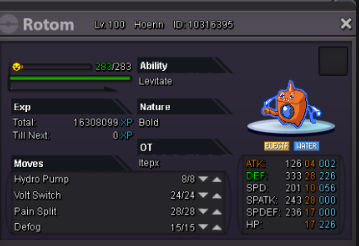
-
up
-
up
-
up
-
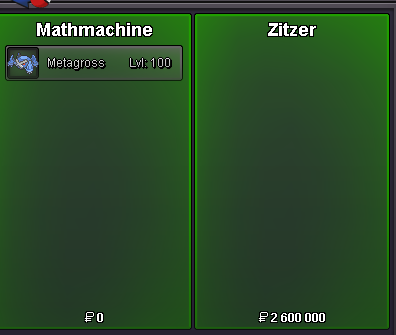
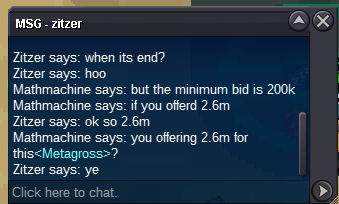
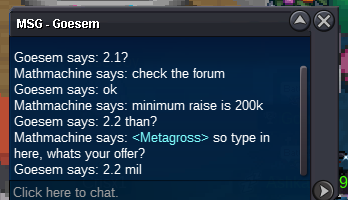
Dude ;-; i tried to contact you cause i was selling my metagross! Now is too late tho. Good luck sir3 hours left!@Artorias (honestly just asking) am i allowed to lower the insta price after the auction started?honestly didnt understood want you mean3 days* @Artorias no @SrTaz one day left 2.4m best offer until nowup@@YhelPabs startedupupupupupupupother thing, i literally asked him to trade like many times he was never online, may i report him for that? can i report him for not trying to pm me in game? i was online whole the game and tryed to pm me lot a times ALWAYSSSSS OFFLINE, and then you come here and force the trade? i could trade it by myself, next time tell you that guy that he shold went online earlier LOL THANK YOU VERY MUCH SIR @Incarnate Have a nice eveningwould it be a trade chat ban? or a game ban? if i can ask this Looking forward to your reply.Actually i price check him and got a lot of bigger prices, actually some people told me that if the local was not choose people can cancel the trade, but if you are saying me that it is false i can sell this cheaper..up

Account
Navigation
Search
Configure browser push notifications
Chrome (Android)
- Tap the lock icon next to the address bar.
- Tap Permissions → Notifications.
- Adjust your preference.
Chrome (Desktop)
- Click the padlock icon in the address bar.
- Select Site settings.
- Find Notifications and adjust your preference.
Safari (iOS 16.4+)
- Ensure the site is installed via Add to Home Screen.
- Open Settings App → Notifications.
- Find your app name and adjust your preference.
Safari (macOS)
- Go to Safari → Preferences.
- Click the Websites tab.
- Select Notifications in the sidebar.
- Find this website and adjust your preference.
Edge (Android)
- Tap the lock icon next to the address bar.
- Tap Permissions.
- Find Notifications and adjust your preference.
Edge (Desktop)
- Click the padlock icon in the address bar.
- Click Permissions for this site.
- Find Notifications and adjust your preference.
Firefox (Android)
- Go to Settings → Site permissions.
- Tap Notifications.
- Find this site in the list and adjust your preference.
Firefox (Desktop)
- Open Firefox Settings.
- Search for Notifications.
- Find this site in the list and adjust your preference.