




New Trade Zone
Trade Zone is now live
Use the new Trade Zone for auctions and instant-price trades so Pokemon and item offers are easy to find.

Carlosdfc
Suspended
-
Joined
-
Last visited
-
Bump
-
bump
-
S.O= 600k Insta = 1.5M Min bid= 100K durations 48 hours after first bid accept pokedollars, cc (400k)
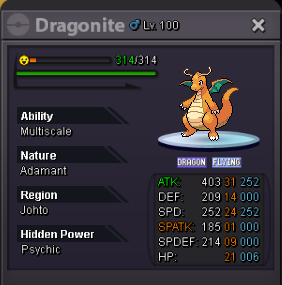
-
i can play on phone with same IP/Connection on computer ... and my computer have the requirements to run the game! I dont understand whats happening all time get the message "can not conneted to server" ... and servers are online. I cant login on yellow, blue or red ... pls help
-
i play on phone with same IP/connection that on pc ... And i already play on pc before like 1 year ago
-
already do that and i keep the same problem. -removed-
-
IM SURE!!!
-
i can login on the phone!!!!!! just not on computer on the same minute: server status: https://ibb.co/exPiHa my login on computer: https://ibb.co/gzJXAv already put PRO64.exe on firewall exceptions! pls help
-
Hi, i used play on phone ... but yesterday i downloaded the game on your site, use 1 option to windown, unzip, open, login ... and the message "can not connect to server" ... server is login and not full so why i cant login. My account is carlosdfc thanks