-
Star Wars Pawniard, Adamant 25 ATK 30x2, Perfect for future Kingambit
2.25m
-
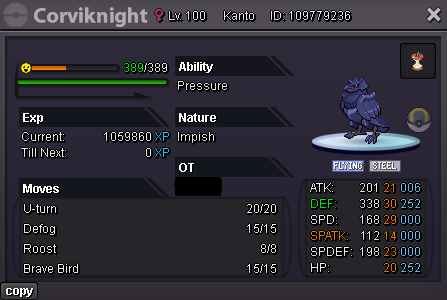
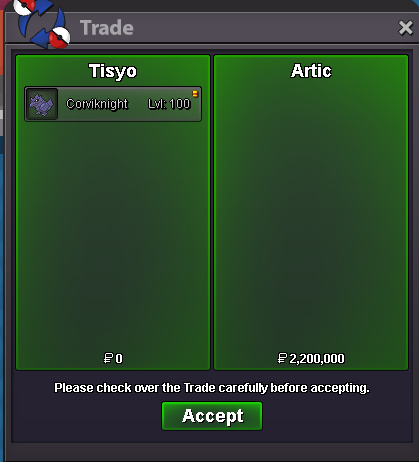
epic impish 20+ corviknight pvp ready
- epic impish 20+ corviknight pvp ready
bump- epic impish 20+ corviknight pvp ready
Start Price: 750k End Point: 24 hours (after start price) Insta Price: No insta Minimum Raise: 100k If you intend to purchase with an alt account, specify the account alongside your bid If a bid is received in the final 15 minutes of the auction, the end point will be delayed by 15 minutes from that bid, and will be delayed by 15 minutes for each new bid thereafter, until the current offer has been held for a full 15 minutes.- WTS jolly kleavor 3x31
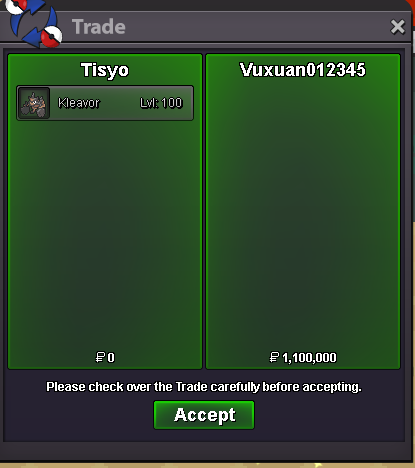
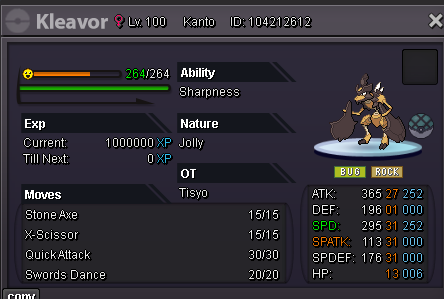
- WTS jolly kleavor 3x31
I am online- WTS jolly kleavor 3x31
- WTS jolly kleavor 3x31
Wts kleavor jolly 3x31 S.o. 500k Min bid 100k Auction ends 24hrs after the 1st bid 15min rule no insta- Scythian Shop, closed for updates!
Wtb 500k magnezone hp fire- Pinkorabane's Factory (Temporarily CLOSE , Rebuild)
wtb the hp fire sceptile- PvP Able poke : semi epic modest Toxel, semi epic Bold Regen Audino
i took both?- PvP Able poke : semi epic modest Toxel, semi epic Bold Regen Audino
basically can i rebid to 500k and a cc?- PvP Able poke : semi epic modest Toxel, semi epic Bold Regen Audino
800k audino- PvP Able poke : semi epic modest Toxel, semi epic Bold Regen Audino
600k toxel 600k audino- (closed) Super Rare Arrocuda 31 Speed 31 Attack
1.2m - epic impish 20+ corviknight pvp ready
Tisyo
Registered User
-
Joined
-
Last visited
Account
Navigation
Search
Configure browser push notifications
Chrome (Android)
- Tap the lock icon next to the address bar.
- Tap Permissions → Notifications.
- Adjust your preference.
Chrome (Desktop)
- Click the padlock icon in the address bar.
- Select Site settings.
- Find Notifications and adjust your preference.
Safari (iOS 16.4+)
- Ensure the site is installed via Add to Home Screen.
- Open Settings App → Notifications.
- Find your app name and adjust your preference.
Safari (macOS)
- Go to Safari → Preferences.
- Click the Websites tab.
- Select Notifications in the sidebar.
- Find this website and adjust your preference.
Edge (Android)
- Tap the lock icon next to the address bar.
- Tap Permissions.
- Find Notifications and adjust your preference.
Edge (Desktop)
- Click the padlock icon in the address bar.
- Click Permissions for this site.
- Find Notifications and adjust your preference.
Firefox (Android)
- Go to Settings → Site permissions.
- Tap Notifications.
- Find this site in the list and adjust your preference.
Firefox (Desktop)
- Open Firefox Settings.
- Search for Notifications.
- Find this site in the list and adjust your preference.