




New Trade Zone
Trade Zone is now live
Use the new Trade Zone for auctions and instant-price trades so Pokemon and item offers are easy to find.

Bicep
Registered User
-
Joined
-
Last visited
Everything posted by Bicep
-
1.3
-
Will pay 1.2
-
Bump
-
Closed ty :)

-
I am still getting the error as well, so whatever was done to revert it was not successful.
-
When trying to battle either Letrix or Ash Westbrook it will give the following message: [ERROR: function "" not found or has not 1 parameters!] I have all the requirements and have beaten the bosses many times before. I am not using Snorlax or Seaking for either fight and have more then enough sinnoh hours. This has been confirmed by multiple people in game who also meet the requirements but are not able to fight the bosses Thanks

-
CLOSE THREAD - BOUGHT IN GAME I am looking for a Relaxed natured Ferroseed I want the subtotal of Def + Spec Def + HP to Equal 70 or higher. 20+ attack is also a preference but not needed.
-
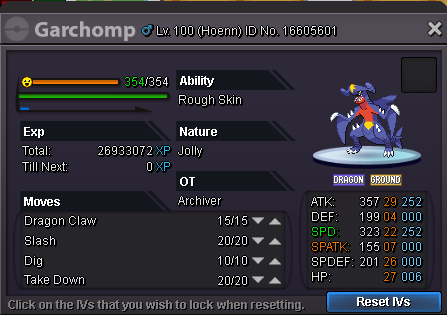
Selling Hidden Ability - Rough skin Epic EV trained pvp ready Sold to Rohnthegreat
-
Bought Thanks
-
I would like to buy the following Gible Nature: Jolly Ability: Sand veil is fine, I pay more for Rough Skin Stats: Attack - 20+ speed - Must be 31 Price Cap on Sand Veil ability Gible - 400k(must be near perfect) Price Cap on Rough Skin ability Gible - 1m(Again must be near perfect for these top prices) Thank you
-
Re: WTS epic H.A Gible <t>I will bid 2 - 100 coin capsules</t>
-
Please close thread