




New Trade Zone
Trade Zone is now live
Use the new Trade Zone for auctions and instant-price trades so Pokemon and item offers are easy to find.

Diego1206
Registered User
-
Joined
-
Last visited
Everything posted by Diego1206
-
if you were refreshing like you said, why i took you 31 min to quote my offer?
-
According to the link to //www.timeanddate.com/ there were 2 min left when I post that. However, supposedly there would have to be a 15 min extension that didn´t happened
-
600k for hp ice rotom
-
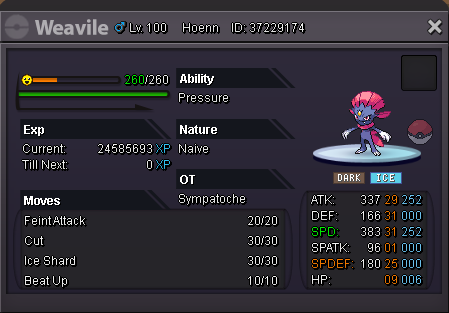
Starting offer: 1m Min bid: 100k Insta 4 m CC=380k Ivs reroll=700k Aution ends in 72 hs after first offer If the auction receives a bid during the last 15 minutes, the ending point is delayed to +15 minutes from that bid, until someone being the c.o. for 15minutes wins
-
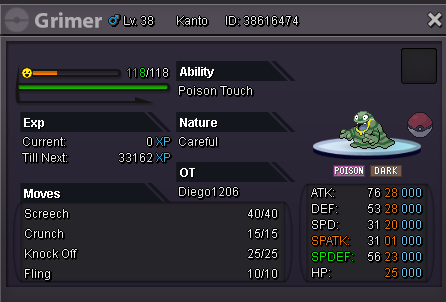
Grimer-alola sold to gokucavs. Congratulations!!!

-
-
-
350k for that rotom 30 speed
-
I'll buy the 100k magnemite HP fire
-
-
Current offer: 2,2 m by gokucavs Min bid: 200k Insta 10 m Accept CC as 400k Aution ends in 72 hs after first offer In accordance with PRO rules: Timer gets extended by 15 minutes if there are any bids in the final 15 minutes of an auction.
-
does the magnezone have a starting offer?
-
The scizor with c.o 150k (previously was 300k)
-
I'll buy clefable 2 (400k) and kingdra (200k)
-
I'll start with scizor and gliscor
-
450k
-
Sorry. I just saw sb already bought sneasel
-
I buy the pinsir and the 17-31 sneasel
-
Is there a min bid?
-
-
Is there a delivery to gold server?
