




New Trade Zone
Trade Zone is now live
Use the new Trade Zone for auctions and instant-price trades so Pokemon and item offers are easy to find.

Popa
Registered User
-
Joined
-
Last visited
Everything posted by Popa
-
ENDS IN 72HRS FROM NOW, GOOD LUCK It is in my topic description.
-
72 hours from the start of my topic and you were 4 minutes late, 18:10
-
Auction is over.

-
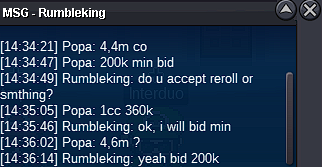
4hrs left8hrs leftup48hrs leftS.O= 2M MIN BID 200K 1CC= 360K ENDS IN 72HRS FROM NOW, GOOD LUCK C.O= 4,6M by rumbleking
 Thanks for the answer, it will only happen when I am on my phone due to wifi stability, won't have problems on PC.Hello, I was playing normally without any warnings on my PC, when i transfered to my android 13 phone it kicked me from the game due to speed violation even tho speed of the game is the same as the one on PC, got warning for perma ban. I don't wanna log on my phone anymore until someone confirm that is all good. Best regards Got answered in game that is due to lag, nothing serious. You can lock the topic.@Ayush812 winner of this auction! gz!ONE DAY LEFTLet's have a weekend auction, auction last until Monday morning 10:00(CET; UTC+01:00) Starting offer 1,5m Min bid: 200k
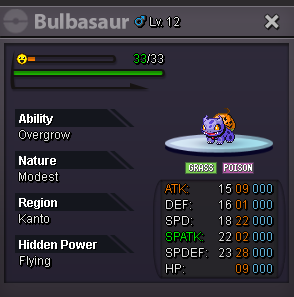 can be closed now.
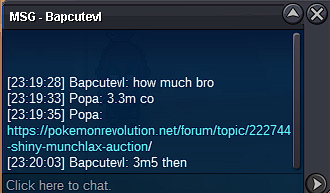
 @Swer4412 winner of this auction. Pm me here or ingame for trade. GZ!12hr left until the end.Starting offer - 2m Minimum raise - 200k Buyout price - 5m Auction lasts until 9th of October 12:15AM
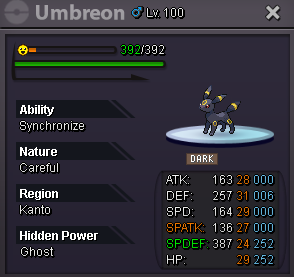 BumpThanks! :)




Account
Navigation
Search
Configure browser push notifications
Chrome (Android)
- Tap the lock icon next to the address bar.
- Tap Permissions → Notifications.
- Adjust your preference.
Chrome (Desktop)
- Click the padlock icon in the address bar.
- Select Site settings.
- Find Notifications and adjust your preference.
Safari (iOS 16.4+)
- Ensure the site is installed via Add to Home Screen.
- Open Settings App → Notifications.
- Find your app name and adjust your preference.
Safari (macOS)
- Go to Safari → Preferences.
- Click the Websites tab.
- Select Notifications in the sidebar.
- Find this website and adjust your preference.
Edge (Android)
- Tap the lock icon next to the address bar.
- Tap Permissions.
- Find Notifications and adjust your preference.
Edge (Desktop)
- Click the padlock icon in the address bar.
- Click Permissions for this site.
- Find Notifications and adjust your preference.
Firefox (Android)
- Go to Settings → Site permissions.
- Tap Notifications.
- Find this site in the list and adjust your preference.
Firefox (Desktop)
- Open Firefox Settings.
- Search for Notifications.
- Find this site in the list and adjust your preference.