




New Trade Zone
Trade Zone is now live
Use the new Trade Zone for auctions and instant-price trades so Pokemon and item offers are easy to find.

Morphil
Registered User
-
Joined
-
Last visited
-
-
Thanks for the help, even if you have performed all the above procedures, the problem has not been solved. The error messages varied with each new configuration, but the game did not execute. I believe the new version is not compatible with my video card, a shame. I will wait for a new update, because I do not know what else to do.
-
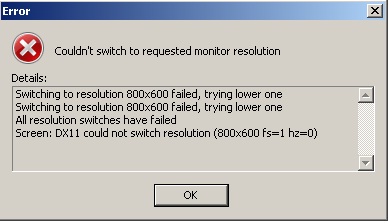
When I try to open the PRO windows 7 name the following error occurs: "Couldn't switch request monitor resolution pokemon revolution Switching to resolution 800x600 failed, trying lower one Switching to resolution 800x600 failed, trying lower one All resolution switches have failed Screen: DX11 could not switch resolution (800x600 fs=1 hz=0)"
-
This same problem occurs on account of my friend "Mattenum". I would be able to restart this quest?
-
-
I found the 8 gems in Kalijodo cave, but when I try to talk to the NPC (Team Magma) at the output port, it sends me again into the carna, claiming not found all the gems. I do not know what to do, I've been 2x in every stone, but no gem appears. Thanks!!!