




New Trade Zone
Trade Zone is now live
Use the new Trade Zone for auctions and instant-price trades so Pokemon and item offers are easy to find.

Calangodmato
Suspended
-
Joined
-
Last visited
-
BUY FERROTHORN SASSY/DRAGONITE RASH H.A SHOW ME
-
I had already talked to xavierOP about PM about boEle asked me who had offered the 2m I told him that I did not remember the nickname, I just remembered that it started with nick. He said the correct nick of the player and I confirmed it. XavierOP knows the nickname of the player.
-
now
-
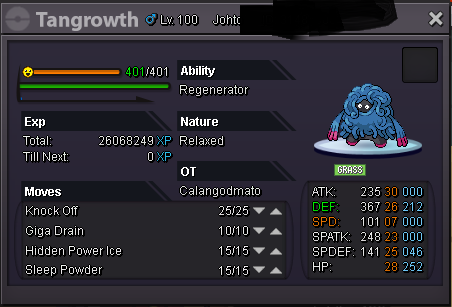
b.o=2m time= the time starts from the first offer and will be 2 day . minimum increase is 100k insta=2.5m + rocky helmet
-
-
Vender

-
-
-
BUY FOOGUS AND AMOOGUS/EPIC
-
My discord is calangodmato@3174
-
Good morning 2-My nickname in PRO is calangodmato, I play on server red. 3-I have 738 hrs and 11 min, I have 32 badges. 4-I'm 16 years old and I come from Brazil. 5-my ambition in PRO is makes me the best pvp player and get a collection of shiny rare. 6-must accept me because I'm a responsible and fun person, and I like help players who started playing now. 7- I've never been to the chronos. :Frown: 8-my favorite pokemon and garchomp, because I really like pokemon type dragon and garchomp and the strongest and fastest. 9-yes, of course I can visit the discord 10-yes, I am very responsible and always follow the rules.
-
I would like to go to the guild. :Angel:
-
recruit me
-
WTB TOGEPI TIMID SERENE GRACE :Heart: ♡
