




New Trade Zone
Trade Zone is now live
Use the new Trade Zone for auctions and instant-price trades so Pokemon and item offers are easy to find.

Stainthegreat
Registered User
-
Joined
-
Last visited
-
Congrats you won it for 34m. I am online now so feel free to add me on discord #Stain5002 or ingame StainTheGreat
-
4 hours and 54 minutes left current c.o is Ghostriders at 34m
-
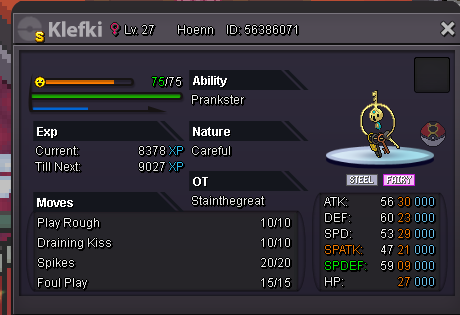
Hi, Auctioning this Shiny Klefki Auction lasts 72 hours Start auction: 20m Instant Price: 50m Accept CC as 420k and reroll as 725K
-
Hello, I had this idea about an ingame shop since the way selling pokes or other items is really inconvenient. I think having a market where you can put a pokemon or item in for a certain amount so anyone can see and buy at anytime that fits them. I think it will be really helpful for anyone that is involved in selling or trading items/pokes since it will allow them to do other things and so they don't have to sit somewhere spamming there prices. what I had in mind is the same setup as an pokeshop so it wouldn't be too hard to code. Stain
