New Trade Zone
Trade Zone is now live
Use the new Trade Zone for auctions and instant-price trades so Pokemon and item offers are easy to find.

Varylis
Registered User
-
Joined
-
Last visited
Everything posted by Varylis
-
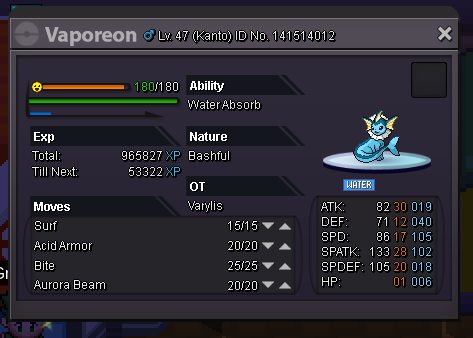
Ahh.. Welp, that would make a lot of sense. Might want to change the tool-tip then in-game because it still says 200hp which is very misleading, especially when you're counting on that pot to heal your 180hp Vaporeon to full. No, I'm aware it won't exceed the cap. I was stating his hp so that you're aware it should be healing my Vaporeon to full, rather than to only 80%hp. However, if they're changed to 120hp then it makes sense, on the flip side it's also frustrating that I wasted 15k thinking it was 200hp as the tool-tip states when in reality it was not.
-
Can ANYONE explain to me why the Hyper Potions don't heal for 200HP like they're supposed to?! I've had to rematch Sabrina approx. 15 times now, I am having terrible luck against her. I decided to buy pots, used 3 on my Vape when he was low. He has a max of 180HP, NOT 200 LIKE IT'S SUPPOSED TO. Except of course on my Arcanine it healed it perfectly fine. This makes NO sense!! It's cost me quite a few fights against Sabrina! I could have won on a few occasions had it not been for this problem! What is going on?!