




New Trade Zone
Trade Zone is now live
Use the new Trade Zone for auctions and instant-price trades so Pokemon and item offers are easy to find.

Wiinglight
Registered User
-
Joined
-
Last visited
-
Finished transaction
-
-
-
-
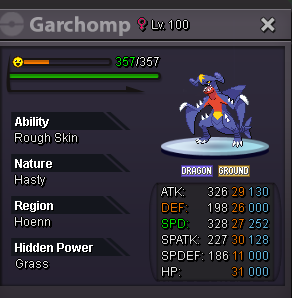
Sold width=219pxhttps://media.discordapp.net/attachments/634771884634013716/746096857167691796/unknown.png?width=433&height=450[/img]
-
The auction has ended , I'll be online in game a few hours , we can meet wherever you want :)
-
Bump
-
-
Just added my discord in the post , could you add me ?
-
Sorry for the late answer , forgot to add my disc :(
-
Thanks for that , had no ideas.o. 800k insta will be added soon after the s.o is payed (min rased 50k) the auction will be 24h long starting from the 1st bid , if anyone will bid in the last 15 min , the 15 min timer will reset Enjoy the game and keep on grinding for the best of the best
 So sorry for everything , was accused of fake bidding if I resolve it , I'll get in touch with you again just keep her safe for 1-2 days I really want it :)Wtb hp fire bello 1.2m or non hp fire one for the asked price
