New Trade Zone
Trade Zone is now live
Use the new Trade Zone for auctions and instant-price trades so Pokemon and item offers are easy to find.

Wispywinds
Registered User
-
Joined
-
Last visited
Everything posted by Wispywinds
-
Yep! Everything appears to be working fine now, the problem Pokemon are in the box and the rest of my party slots have been freed up. Thanks for the help!
-
Not sure if this is a more difficult issue to tackle or not, but I figured I'd bump in case this starts to get drowned.
-
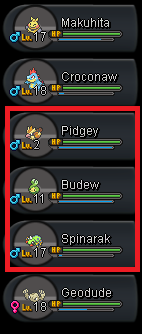
Hi there, I just merged my account over from the Red to Silver server and upon logging in, I noticed that three of the 6 Pokemon in my party couldn't be switched around or deposited into my PC. I've gone to the support section of the Discord and was directed here. The Pokemon I need to deposit are: - Pidgey, Lv2 (Slot 3 of party) - Budew, Lv11 (Slot 4 of party) - Spinarak, Lv 17 (Slot 5 of party) My IGN is Wispywinds, and the Pokemon can be deposited anywhere in the PC, I really just need the three slots back. Thanks a bunch!