Skip to content
View in the app

A better way to browse. Learn more.

Pokemon Revolution Online

A full-screen app on your home screen with push notifications, badges and more.

To install this app on iOS and iPadOS
  1. Tap the Share icon in Safari
  2. Scroll the menu and tap Add to Home Screen.
  3. Tap Add in the top-right corner.
To install this app on Android
  1. Tap the 3-dot menu (⋮) in the top-right corner of the browser.
  2. Tap Add to Home screen or Install app.
  3. Confirm by tapping Install.

the SleepChomp

Featured Replies

  • Author
Make a head of garchomp i think would be a nice idea for cosmetic

hatchomp.png.ad5fbd7a7fac207c37ef1a41a8b91e84.png

there is no need for shiny version xD


...btw i think its too large to fit into a character's space :/

Edited by UnscarreD

[ATTACH=full]59031[/ATTACH]

there is no need for shiny version xD


...btw i think its too large to fit into a character's space :/

Its so cool but i think would need to be smaller

xdd2.png

  • 2 weeks later...
  • Author
Its so cool but i think would need to be smaller


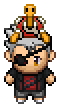
I tried to reduce it but this is the smallest I managed to do

ChompOutfit.png.02dc2f041b4d54ee7152794fd6ca2e19.png

even if it's not really good im goin to post it in spriting corner

but before i have to thank you for your suggestions :)

Edited by UnscarreD

Create an account or sign in to comment

Account

Navigation

Search

Search

Configure browser push notifications

Chrome (Android)
  1. Tap the lock icon next to the address bar.
  2. Tap Permissions → Notifications.
  3. Adjust your preference.
Chrome (Desktop)
  1. Click the padlock icon in the address bar.
  2. Select Site settings.
  3. Find Notifications and adjust your preference.