Skip to content
View in the app

A better way to browse. Learn more.

Pokemon Revolution Online

A full-screen app on your home screen with push notifications, badges and more.

To install this app on iOS and iPadOS
  1. Tap the Share icon in Safari
  2. Scroll the menu and tap Add to Home Screen.
  3. Tap Add in the top-right corner.
To install this app on Android
  1. Tap the 3-dot menu (⋮) in the top-right corner of the browser.
  2. Tap Add to Home screen or Install app.
  3. Confirm by tapping Install.

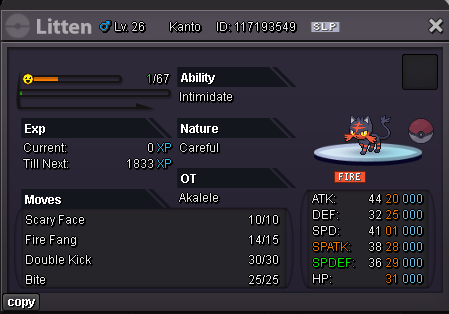
craeful h.a litten

ActiveSilverPokemonAuction
Akalele Time left: Highest Bidder: Yehia8f1
Start price
100.000
Instant price
-
Minimum bid
20.000
Current offer
460.000

Image of the Pokemon for sale

litten.png

Bid history

460.000
2026-09-19 22:20:02
Krypple
440.000
2026-09-19 18:59:03
Agon404
420.000
2026-09-19 18:57:59
Krypple
400.000
2026-09-19 18:40:28
380.000
2026-09-19 18:33:55
Krypple
360.000
2026-09-19 17:01:19
340.000
2026-09-19 16:59:36
Krypple
320.000
2026-09-19 16:44:52
300.000
2026-09-19 16:44:25
Krypple
280.000
2026-09-19 16:44:11
260.000
2026-09-19 16:41:18
Krypple
240.000
2026-09-19 16:40:09
220.000
2026-09-19 16:34:11
Ganbate132
200.000
2026-09-19 14:32:56
180.000
2026-09-19 13:46:52
Ganbate132
160.000
2026-09-19 13:43:41
140.000
2026-09-19 13:41:12
Somphong1616
120.000
2026-09-19 13:15:45
Muscream
100.000
2026-09-19 13:11:10

Account

Navigation

Search

Search

Configure browser push notifications

Chrome (Android)
  1. Tap the lock icon next to the address bar.
  2. Tap Permissions → Notifications.
  3. Adjust your preference.
Chrome (Desktop)
  1. Click the padlock icon in the address bar.
  2. Select Site settings.
  3. Find Notifications and adjust your preference.