




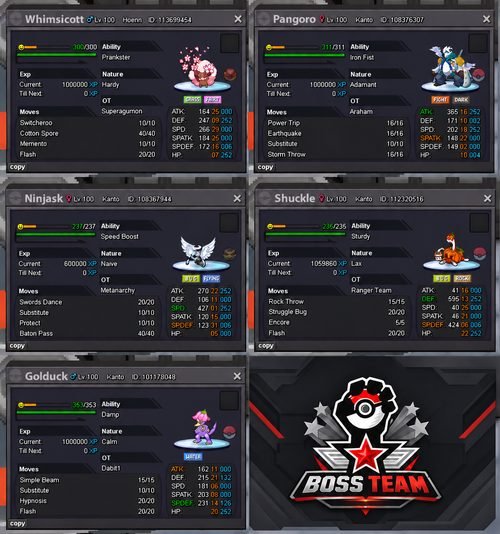
[Utility] Boss Team | Prankster (HA) Easter Whimsicott w/ Valentine Ball | Iron Fist Adamant Halloween Pangoro | Speed Boost +SPD Nature Halloween Ninjask w/ Luxury Ball | Sturdy Halloween Shuckle | Valentine Golduck
Image of the Pokemon for sale
Note
Included in this auction is a boss-team bundle, consisting of Form Whimsicott, Pangoro, Ninjask, Shuckle, and Golduck. These Pokémon are being sold together as a single package and form the key components of an effective boss team.
For those unfamiliar, bosses are one of the primary sources of income in PRO, making a reliable boss team a worthwhile investment. Each Pokémon in this bundle has a specific role and has been built to perform effectively in boss battles.
There are several guides available explaining how these teams work and how to use them effectively. One useful example can be found here:
Boss Team Guide: BossTeam - How to Defeat every Boss in Game - NPC Battle Guides - Pokemon Revolution Online
Accepted Payments
Pokédollars, Coin Capsules (500k each), IV Reroll Tickets (700k each).
Anti-Snipe Rule
Any bid placed during the last 15 minutes of the auction will extend the auction by 15 minutes. The auction will continue to extend until no new bids are placed for 15 minutes.
Bid history
No bids or price offers have been placed yet.