Skip to content
View in the app

A better way to browse. Learn more.

Pokemon Revolution Online

A full-screen app on your home screen with push notifications, badges and more.

To install this app on iOS and iPadOS
  1. Tap the Share icon in Safari
  2. Scroll the menu and tap Add to Home Screen.
  3. Tap Add in the top-right corner.
To install this app on Android
  1. Tap the 3-dot menu (⋮) in the top-right corner of the browser.
  2. Tap Add to Home screen or Install app.
  3. Confirm by tapping Install.

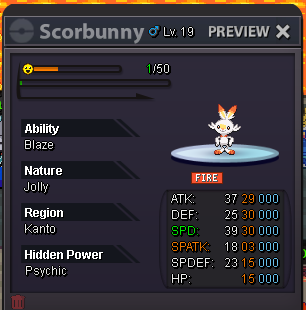
Epic Scorbunny jolly

ActiveSilverPokemonAuction
Kairu Time left: Highest Bidder: Vnbodoi
Start price
100.000
Instant price
-
Minimum bid
1
Current offer
111.116

Image of the Pokemon for sale

Screenshot 2026-08-10 225835.png

Bid history

Vnbodoi
111.116
2026-08-11 18:00:19
111.115
2026-08-11 17:30:14
90skid
111.114
2026-08-11 16:20:45
Karyyy
111.113
2026-08-11 16:02:26
Vnbodoi
111.112
2026-08-11 13:03:40
143zed
111.111
2026-08-11 12:45:50
Baezick
100.002
2026-08-11 12:45:43
Vnbodoi
100.001
2026-08-11 10:27:03
Karyyy
100.000
2026-08-11 07:41:31

Account

Navigation

Search

Search

Configure browser push notifications

Chrome (Android)
  1. Tap the lock icon next to the address bar.
  2. Tap Permissions → Notifications.
  3. Adjust your preference.
Chrome (Desktop)
  1. Click the padlock icon in the address bar.
  2. Select Site settings.
  3. Find Notifications and adjust your preference.