Skip to content
View in the app

A better way to browse. Learn more.

Pokemon Revolution Online

A full-screen app on your home screen with push notifications, badges and more.

To install this app on iOS and iPadOS
  1. Tap the Share icon in Safari
  2. Scroll the menu and tap Add to Home Screen.
  3. Tap Add in the top-right corner.
To install this app on Android
  1. Tap the 3-dot menu (⋮) in the top-right corner of the browser.
  2. Tap Add to Home screen or Install app.
  3. Confirm by tapping Install.

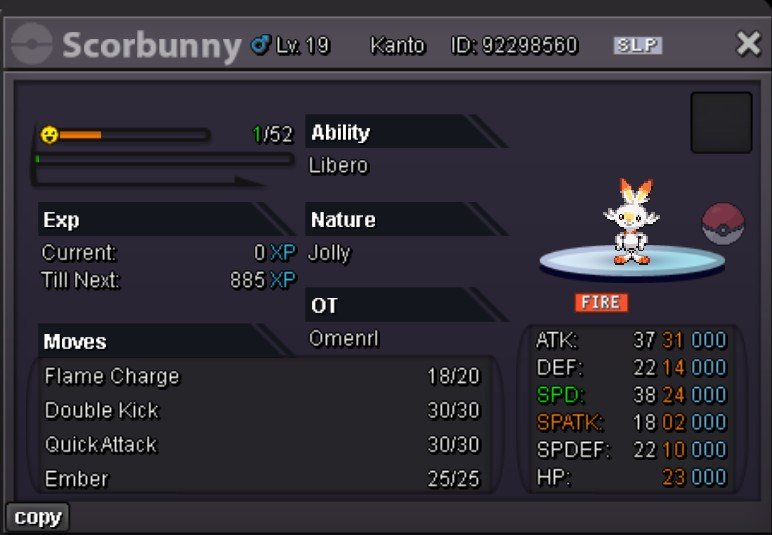
Jolly Max Atk Hidden Ability Scorbunny

ActiveGoldPokemonAuction
Omenrl Time left: Highest Bidder: Gillot97
Start price
200.000
Instant price
1.000.000
Minimum bid
10.000
Current offer
600.000

Image of the Pokemon for sale

wabbit.jpg

Bid history

Gillot97
600.000
2026-08-13 03:18:42
350.000
2026-08-13 02:38:54
Kbary
340.000
2026-08-13 02:37:34
Zi00
330.000
2026-08-13 02:32:19
320.000
2026-08-13 02:30:55
Gillot97
310.000
2026-08-13 01:47:23
300.000
2026-08-13 01:16:16
290.000
2026-08-12 23:49:32
Shellos
280.000
2026-08-12 23:03:29
270.000
2026-08-12 23:02:49
Hasan68
260.000
2026-08-12 19:22:42
250.000
2026-08-12 19:16:15
Shellos
240.000
2026-08-12 12:16:22
230.000
2026-08-12 12:15:32
Shellos
220.000
2026-08-12 11:56:34
210.000
2026-08-12 08:56:15
Tendth123
200.000
2026-08-12 06:03:18

Account

Navigation

Search

Search

Configure browser push notifications

Chrome (Android)
  1. Tap the lock icon next to the address bar.
  2. Tap Permissions → Notifications.
  3. Adjust your preference.
Chrome (Desktop)
  1. Click the padlock icon in the address bar.
  2. Select Site settings.
  3. Find Notifications and adjust your preference.