




New Trade Zone
Trade Zone is now live
Use the new Trade Zone for auctions and instant-price trades so Pokemon and item offers are easy to find.

Pcman1985
Registered User
-
Joined
-
Last visited
-
Thank you for your help. All good.
-
Going on now, johto e4 pokemon centering. Thank you
-
Hi If you could help me that would be very much appreciated. Thank you.
-
How much should I offer a player to evolve my Graveller and Haunter as they evolve by trade? Currently they're Lv 90+
-
The pokemon has been received. Thank you very much for your help.
-
......
-
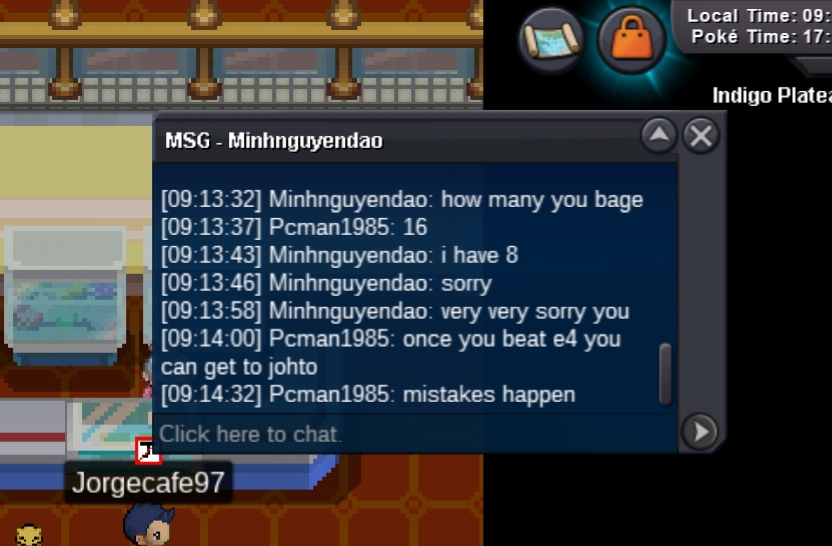
I tried to add them but the screenshot gets crossed out, username was Minhnguyendao Is there a way so I can post the screenshot so that doesn't happen
-
Thank you
-
Hey Fluffles can you check my post please?
-
I traded a Graveller and a Haunter to evolve to a player but he says he was unable to access them in his PC so it looks like that I won't be able to get the Gengar and Golem back. I don't know if anyone can help me here that can get them back or if there is anyone from game support that could do anything. I'm just hoping that it was genuine that he couldn't access them and that I wasn't scammed.
-
Thank you, that looks like it has resolved the issue :)
-
So when I play the game on my phone (galaxy s9) it runs fine, until.I enter a battle. As soon as my Pokemon comes out the game crashes, then closes down. Never used to happen before.
