




New Trade Zone
Trade Zone is now live
Use the new Trade Zone for auctions and instant-price trades so Pokemon and item offers are easy to find.

Simba
Registered User
-
Joined
-
Last visited
Everything posted by Simba
-
All bless for you and thanks for all your work for PRO
-
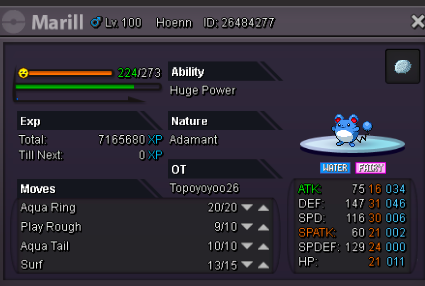
I accedentally leveled up my marill to lvl 100 with rare candies... In-game name: Simba Server: Gold Pokemon ID and/or screenshot: 26484277
-
I accedentally leveled up my marill to lvl 100 with rare candies... In-game name: Simba Server: Gold Pokemon ID and/or screenshot: 26484277
-
Im on the game and it works now! thank you so much!
-
yes i have been playing on mac for over a year, and i recently got high sierra and suddenly it is now working. i deleted my old PROMAC file and installing the new one now. i am hoping this works because this is my favorite pokemon game and lots of my friends play it as well. (I have macOS High Sierra Version 10.135)
-
I open the file and it instantly closes. i tried getting a different archiver, still no luck. any help? I have been playing for a while and i don't want to lose my progress.
