New Trade Zone
Trade Zone is now live
Use the new Trade Zone for auctions and instant-price trades so Pokemon and item offers are easy to find.

Theotheone
Registered User
-
Joined
-
Last visited
-
Bonjour tout le monde ! Je vous soumet ma candidature ! -Pseudo dans le jeu : TheoTheone ( p'tite rèf à Neotheone tmtc ) -Temps de jeu : 65 h ( augmente régulièrement ) -Âge : 17 ans ( bientôt la majorité ) -Quelques mots sur moi : Etudiant ( Futur bachelier ) , Sapeur Pompier, Sympa, Serviable, Débrouillard. Apprécie les Pokemons / les animes / manger / le sport / Ouvert d'esprit. -Ai-je Discord ? Oui -Où en suis-je dans l'aventure ? troisième badge de Johto. -Quels sont mes objectifs dans le jeu ? Je souhaite découvrir les facettes de Pokemon que je ne connais pas. Je voudrais progresser en strat / PVP ( pour ne pas dire débuter ) . Bien que le jeu soit multijoueur mon expérience est surtout basée sur le PvE et je souhaite changer ça ! Mais aussi vous rejoindre ;) ! -Pourquoi devriez-vous me choisir ? J'aime me donner à fond et mener à bien des projets diverses et variés notamment dans les jeux vidéos ! !
-
Ok thank you ! U helo me so much !
-
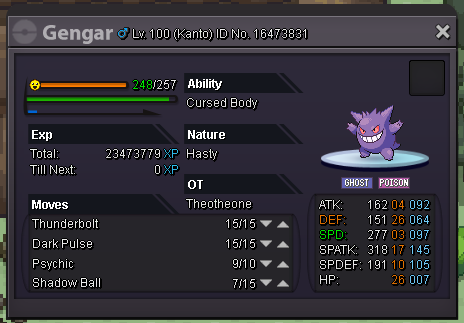
Hello I have a little problem with my gengar, he does not get ev. Here is a screenshot of my Gengar. I would improve his speed but even with fifty fights no ev have progressed. Can you help me please ?