




New Trade Zone
Trade Zone is now live
Use the new Trade Zone for auctions and instant-price trades so Pokemon and item offers are easy to find.

Shotty
Registered User
-
Joined
-
Last visited
Everything posted by Shotty
-
thanks for the reply but the advice I got previously was helpfully enough to get the evo trade completed. in the future I will use that thread, just couldn't find it before when it was needed. thanks again for all the help guys really appreciate it!!
-
little confused about the hh?
-
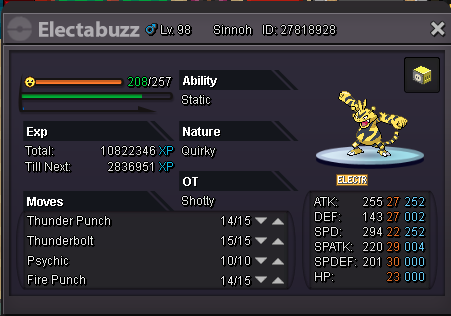
Hi, I'm looking for someone to help me evolve my electabuzz through trade but fear that someone will scam me once they receive it, so preferable someone trusted would be nice.
-
As long as its strong enough to wipe all the bosses I'm good preferable a decent Pokemon.