New Trade Zone
Trade Zone is now live
Use the new Trade Zone for auctions and instant-price trades so Pokemon and item offers are easy to find.

Poopsmagoops
Registered User
-
Joined
-
Last visited
Everything posted by Poopsmagoops
-
-
-
Wtb epic metagross, 30 or 31 speed jolly. Willing to pay a lot of money cash. DM me I’m on here regularly.
-
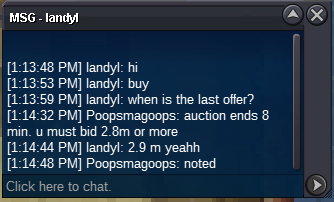
725k EDIT: didn’t realize auction already ended, cancel my offer as it was too late.
-
I buy ape iron fist 1 m
-
Start
-
2cc offer =740k
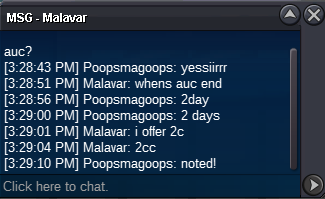 start:1k min raise: 25k insta: none duration time: 48h after first bid accepted payments: cc=370k, iv rr=680k, pokedollar
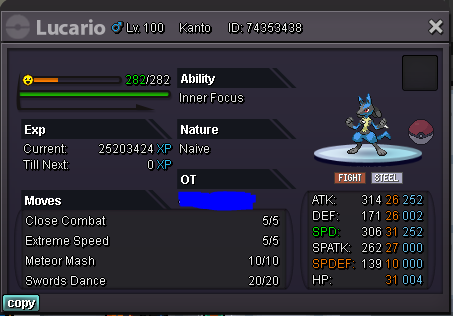 startBuy lvl 45 rotom 150kThanks!Can someone please detail all legendaries that need to be caught to catch Jirachi? All birds, dogs, and regis? Or only need to see them all? Bc I thought you could only catch one of each. But it says the requirements are to catch all of them. Just confusedPref calm or sassy. Need ha. Don’t care about hp fire. Pm me
Account
Navigation
Search
Configure browser push notifications
Chrome (Android)
- Tap the lock icon next to the address bar.
- Tap Permissions → Notifications.
- Adjust your preference.
Chrome (Desktop)
- Click the padlock icon in the address bar.
- Select Site settings.
- Find Notifications and adjust your preference.
Safari (iOS 16.4+)
- Ensure the site is installed via Add to Home Screen.
- Open Settings App → Notifications.
- Find your app name and adjust your preference.
Safari (macOS)
- Go to Safari → Preferences.
- Click the Websites tab.
- Select Notifications in the sidebar.
- Find this website and adjust your preference.
Edge (Android)
- Tap the lock icon next to the address bar.
- Tap Permissions.
- Find Notifications and adjust your preference.
Edge (Desktop)
- Click the padlock icon in the address bar.
- Click Permissions for this site.
- Find Notifications and adjust your preference.
Firefox (Android)
- Go to Settings → Site permissions.
- Tap Notifications.
- Find this site in the list and adjust your preference.
Firefox (Desktop)
- Open Firefox Settings.
- Search for Notifications.
- Find this site in the list and adjust your preference.