




New Trade Zone
Trade Zone is now live
Use the new Trade Zone for auctions and instant-price trades so Pokemon and item offers are easy to find.

Caffeinated
Registered User
-
Joined
-
Last visited
-
Like SViper mentioned, it's simply not feasible at this time. If you'd like to see that changed, then you need to go address the issue with Apple.
-
It's down for maintenance. It will be back up Friday
-
Thanks. I kinda noticed this when I evolved my magikarp. I've been keeping my pokes unevolved till now mainly because they look cuter that way, but now I'm leaving them all unevolved till lvl 99 or longer
-
Thanks! I'm surprised that it was not yet taken.
-
No I don't think so.
-
The only reason that Silver has more people on the leaderboards is that Silver used to be two servers that were combined. Leave all of your files in a folder, right click PRO.exe and click "Create a Shortcut" then you can put your shortcut on your desktop.
-
Both are good. If you already have friends who play, go to their server. If you don't, then pick whichever you like. I picked Silver simply because I preferred to play Silver version to Gold back in the day, but the names have no bearing on the servers in PRO.
-
Right now there are about 700 online on Silver and 600 online for Gold. Trust me, whichever server you pick there will be plenty of people.
-
They're virtually the same except that Silver currently has more people
-
They're all around lvl 30 except Magikarp. I'm purposefully not evolving the others. I'll most definitely have Magikarp evolved by the time I get Surf though
-
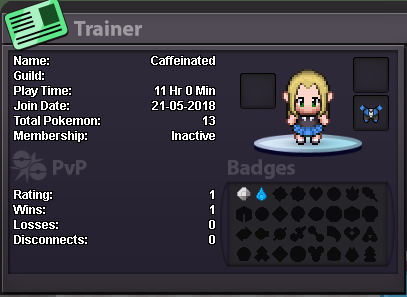
Your Discord Tag: Yamero#0644 Your Trainer Card: (See Below) Are you an active player?: At least once per day for several hours at a time Are you of the age 16 years or up?: 21 Do you meet the requirements to join this guild?: I believe so Why do you feel you will be a good addition for this guild?: I'm active on the forums, discord, and in game; I have Pokémon experience going as far back as Red (my first game) and Crystal (my favorite game); and I'm a very friendly. What server did you make your first account on? (Blue, Red, Yellow, Gold, or Silver): Silver
-
That's not really related to the topic But the iOS issue is on Apple for making it extremely difficult in the first place for 3rd parties to make apps in addition to iOS not necisarilly having the capability to handle games like PRO. There are 728 total moves and 807 total Pokemon. coding each and every Pokemon, and all of the moves that they can learn takes a lot of time and effort.
-
Hi Guys! I'm just getting started in PRO, but I'm quite active and plan on remaining active for the foreseeable future. Because of my new-player smell, I am as of yet friendless here:PiplupCry:, and would like to fix that. Even if you don't want me in your guild, you can say "hi" to me in the PRO Discord where I'm known as "Yamero" (until I'm high enough Discord level to change it) or in game, where my IGN is the same as my screen name on the forums: "Caffeinated" Thanks for reading. Have a wonderful day!
-
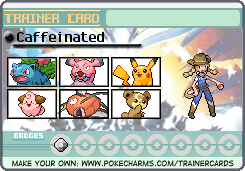
I'm not too far into the game. I'm grinding now to fight Misty. Right now I have Ivysaur, Snubbull, Pikachu, Cleffa, Magikarp, and Teddiursa. I don't think I'll have too much trouble with Misty, being that my first four Pokémon all have Grass or Electric moves, but are there any issues I could see later in Kanto with this comp?
-
PRO already has a Discord server
