New Trade Zone
Trade Zone is now live
Use the new Trade Zone for auctions and instant-price trades so Pokemon and item offers are easy to find.

Kylro
Registered User
-
Joined
-
Last visited
-
I think everyone will agree that the lack of a weather duration counter in battle is pretty annoying and makes playing vs or as an weather team really bad. A simple mouseover on the weather icon would be enough to make things a lot easier in pvp. To collect all weather bugs: - If there are two pokemon with weather abilities send into the battle it should take the weather effect of the slower pokemon which is not the case at the moment. The effect of the faster pokemon is taken - this is wrong - The weather icon is not updated correctly if the weather is changed. Sometimes it still shows the icon of the old weather All this 3 bugs are pretty devastating for weather teams or vs weather teams and should be fixed as soon as possible.
-
IGN: Kylro Playtime: 450h+ PVP rating: 150 Vote for Nature Reroll Ticket: NO Reason: This is the first step to pay2win Vote for Birth Island: no Reason: legendarys should be difficult to catch
-
-
-
Inside the PokePvP.rar archive should be a folder called PokePvP. If you extract the archive with programs like WinRar you should get this folder (PokePvP). Inside this folder is the PokePvP.jar file you need to run
-
You extracted the wrong file. 1) Download the file and extract the .rar not the .jar file. You need to run the .jar file :) (.jar is a Java file that you need to run with Java - if Java is installed correctly on the computer a double-click should be enough)
-
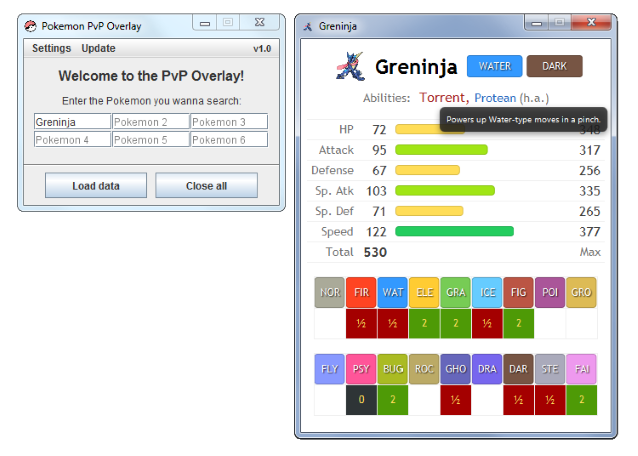
Hi guys, while battling in PvP Queue i ran into the issue that looking up enemies Pokemon took to long and was not very efficient. Because of this i started developing a small overlay tool that searches and displays all stats you need in a compact and fast way. Since it might be useful for other players too i decided to share it with you. Features - Allows to search for up to 6 Pokemon at once and displays their stats in a compact way Example Installation Installation is super simple. Just download the Tool from here, extract the PokePvP.rar archive and run the Java file PokePvP.jar. (VirusTotal link: here) Please notice: You need to have Java installed on your computer!