New Trade Zone
Trade Zone is now live
Use the new Trade Zone for auctions and instant-price trades so Pokemon and item offers are easy to find.

Fantasmo
Registered User
-
Joined
-
Last visited
-
Name Change Username: Abel0th New username: Fantasmo Server to transfer from: Gold
-
[bGCOLOR=rgba(0, 0, 0, 0)]Name Change[/bGCOLOR] [bGCOLOR=rgba(0, 0, 0, 0)][/bGCOLOR] [bGCOLOR=rgba(0, 0, 0, 0)]Username: rennisho123[/bGCOLOR] [bGCOLOR=rgba(0, 0, 0, 0)]New username: Abel0th[/bGCOLOR] [bGCOLOR=rgba(0, 0, 0, 0)]Server to change the name from: Gold[/bGCOLOR]
-
And no, it does not current have the move
-
I can't relearn spore on my paras. I tried relogging and evolving to parasect but it still won't work. The in game pokedex says it learns at lvl26 and mine is at 78 rn.
-
found a instant buyer in-game, thx. sold.
-
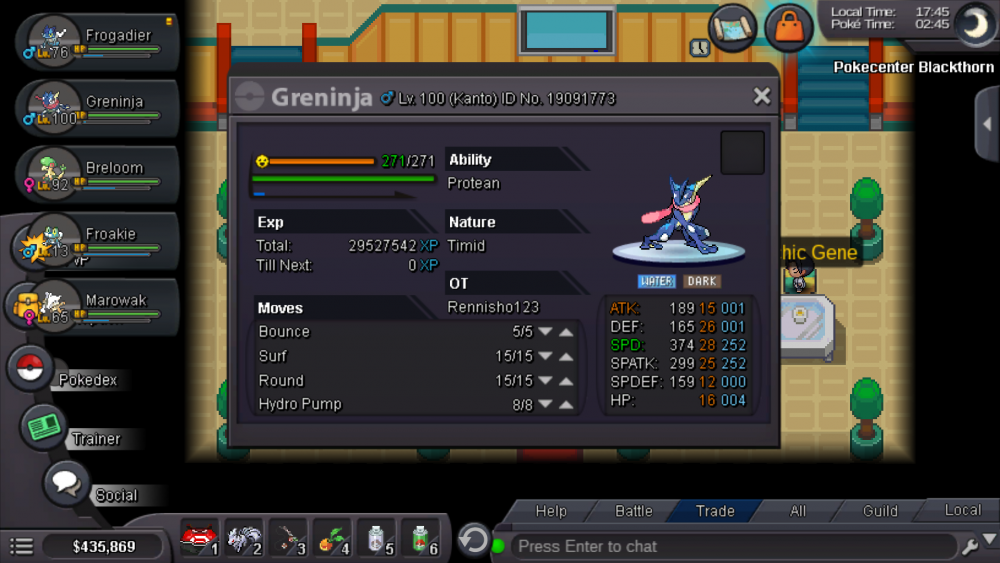
Auctioning greninja ^^ hidden power rock. Auction for 72hrs, start offer 800k instant 2m
-
-
Looking to build a competitive rain team with politoed, pls help with a team of pokes with movesets, ability, nature, evs etc.
-
Need help building rain team around drizzle politoed, need 5 other poke. Pls give nature, item and movesets, as well as reasons why said pokemon is included. thx.