




New Trade Zone
Trade Zone is now live
Use the new Trade Zone for auctions and instant-price trades so Pokemon and item offers are easy to find.

Majora93
Registered User
-
Joined
-
Last visited
-
Ow i activate the wrong MS, i thought that i had activated this 15 days membership.... sorry for the incovenience and thanks to the explanation.
-
I said everything that i can to prove im not lying, such a waste of time because ur mystake
-
the mistake was yours, and u dont seen to care. I bought many coins at this server, i have 6million on my account. If u think im lying, because a 15 days ms. Im just requiring whats mine. Use ur tools to investigate this right!
-
waiting someone....
-
you cant*
-
i cant see with ur tools the 50 coins spent around day 6?
-
and i activated the ms day 6, how it could be 3 days? if it was a 15 days ms
-
Man i bought one 15 days ms, dont remember exactly the day... i think it should be day 6... my ms ended day 6. something is really wrong with ur tools. i have 70 more coins, im not lying, the maintenance made this.
-
after the maintenance** correcting**
-
I bought one 15 days membership these days, before the maintenance the membership has gone. I need someone to solve my problem.
-
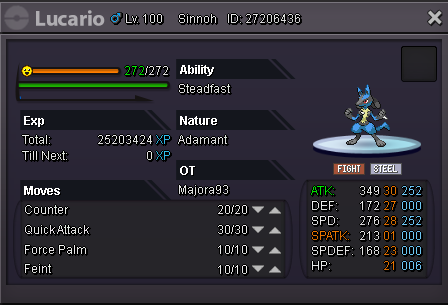
lucario sold
-
arceusisgod can u give me 800k more some pokemon or other thing?
-
-
I accept reroll tickets(650k), pokemons, and cc(330k). I want 1m for him alt=lucario 1.5m.pnghttps://pokemonrevolution.net/forum/data/attachments/101/101603-4ae17e7d4a14a1ea2fd69a73249878ba.jpg[/img]
-