




New Trade Zone
Trade Zone is now live
Use the new Trade Zone for auctions and instant-price trades so Pokemon and item offers are easy to find.

Mintybell
Registered User
-
Joined
-
Last visited
-
- IGN: Mintybell - Discord name: Minty#9230 - Pokemon name: Virixa - Pokemon Typing: Dragon/Ghost - Pokemon description: Virixa a dragon/ghost type Pokemon, Virixa like living near rivers or lakes with tall trees to hide and climb in. They are curious in nature but like to trick humans into getting lost and scared in the wilds before 'helping' them in order to get pokemon treaties, however they do not like human buildings. Female Virixa have smaller and more horns on their snouts, while Males have larger and fewer horns. Both genders have spines near the base of their tails, going upwards of their spines. The older they are, the more spines they grow. Due to living near water, they do learn an abundant of water type moves. Being a ghost typing, they are able to pass through solid objects and humans to cause chills during their pranks! Their special ability is Run away, And hidden ability Magic Bounce. - Picture/drawing (optional):
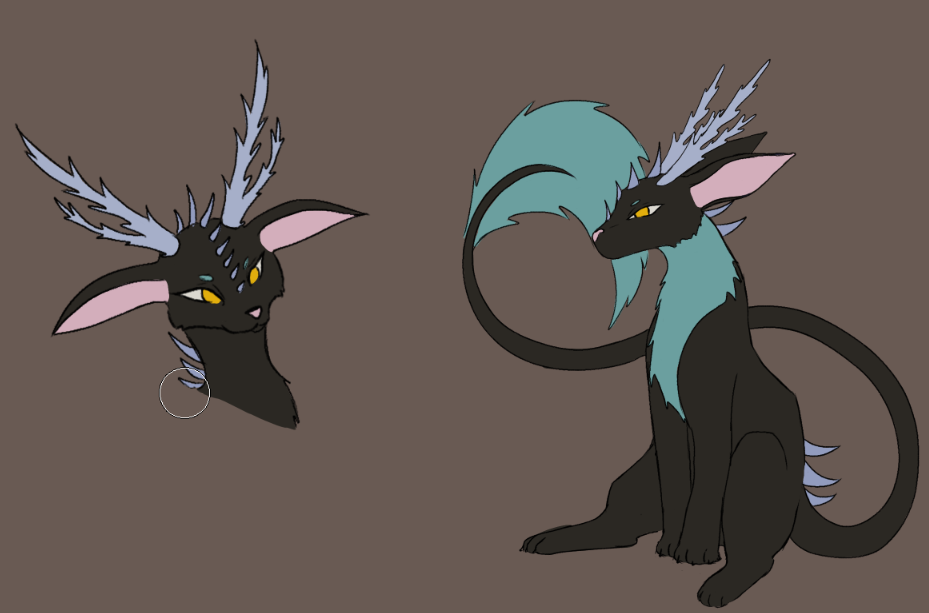
-
1. What's your Player name (IGN)? Mintybell 2. Number of hours played? 22 hrs 3. What's your favorite Pokemon? Vaporeon 4. How old are you? 22 5. When's your Birthday? (Optional) November