




New Trade Zone
Trade Zone is now live
Use the new Trade Zone for auctions and instant-price trades so Pokemon and item offers are easy to find.

Luxiao
Registered User
-
Joined
-
Last visited
Everything posted by Luxiao
-
400k
-
start corpish 2 600k
-
Halloween Form Jolly Weavile Pressure 1.3m SOLD

-
@Itzronin you are the winner. just let me know when u will be online or just pm me in game 🙂Jolly Mimikyu Disguise 600k SOLD
 Note: This is a bundle Starting Offer: 1 Min. Bid: 1 No Insta Auction ends 24hrs after the first bid Countdown: https://www.tickcounter.com/countdown/4293452/bundle-countdown


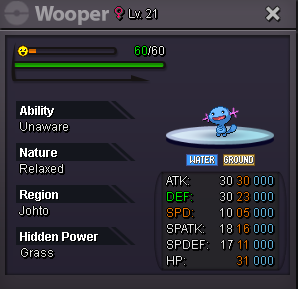 Added a bunch of untrained pokes, form pokes and removed some pokes that are sold Untrained Semi-Epic Bold Klefki Prankster 600k SOLD
 nope. it's already soldHello. I'm about to request a story service from someone but I remembered that there is 2fa now. We need approve the device they will be using right? So after they do the story service. How can I make 2fa disable for their device?Adamant Ambipom Technician 200k SOLD
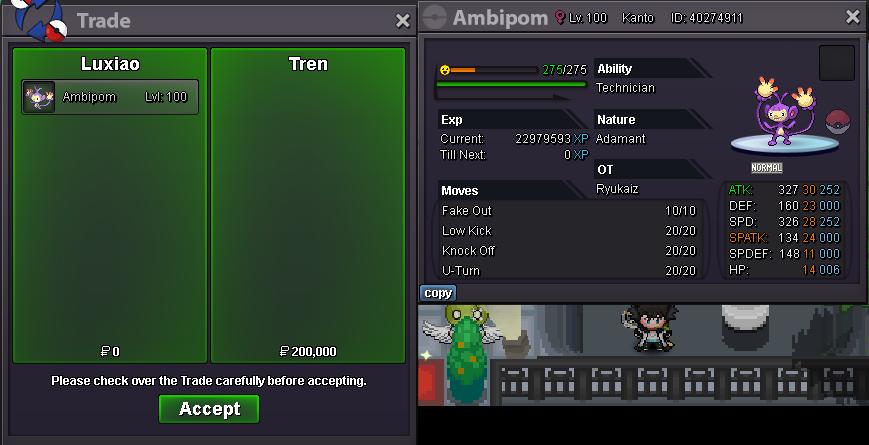 @Tren Okay deal. Just pm me here or in game. I'm online most of the time 🙂@Rocketeer777 You win gligar @Itzronin You win sandile You guys can pm me in discord or in game 🙂20mins left for gligar and sandile@Rocketeer777 You win the quagsire @Rozerw You win the swinub You guys can pm me in discord or in game 🙂1hr 18mins left for swinub and quagsire



Account
Navigation
Search
Configure browser push notifications
Chrome (Android)
- Tap the lock icon next to the address bar.
- Tap Permissions → Notifications.
- Adjust your preference.
Chrome (Desktop)
- Click the padlock icon in the address bar.
- Select Site settings.
- Find Notifications and adjust your preference.
Safari (iOS 16.4+)
- Ensure the site is installed via Add to Home Screen.
- Open Settings App → Notifications.
- Find your app name and adjust your preference.
Safari (macOS)
- Go to Safari → Preferences.
- Click the Websites tab.
- Select Notifications in the sidebar.
- Find this website and adjust your preference.
Edge (Android)
- Tap the lock icon next to the address bar.
- Tap Permissions.
- Find Notifications and adjust your preference.
Edge (Desktop)
- Click the padlock icon in the address bar.
- Click Permissions for this site.
- Find Notifications and adjust your preference.
Firefox (Android)
- Go to Settings → Site permissions.
- Tap Notifications.
- Find this site in the list and adjust your preference.
Firefox (Desktop)
- Open Firefox Settings.
- Search for Notifications.
- Find this site in the list and adjust your preference.