




Skip to content
View in the app

A better way to browse. Learn more.

Pokemon Revolution Online

A full-screen app on your home screen with push notifications, badges and more.

To install this app on iOS and iPadOS
  1. Tap the Share icon in Safari
  2. Scroll the menu and tap Add to Home Screen.
  3. Tap Add in the top-right corner.
To install this app on Android
  1. Tap the 3-dot menu (⋮) in the top-right corner of the browser.
  2. Tap Add to Home screen or Install app.
  3. Confirm by tapping Install.
New Trade Zone
Trade Zone is now live
Use the new Trade Zone for auctions and instant-price trades so Pokemon and item offers are easy to find.
Open Trade Zone

Inell1314

Suspended
  • Joined

  • Last visited

  1. Oh, sry. didnt saw that. Thanks you very much. =)
  2. Hello, there is any new yet?
  3. Hello. there is any reply from admin?
  4. Thanks for the help. I will wait up for the admins reply.
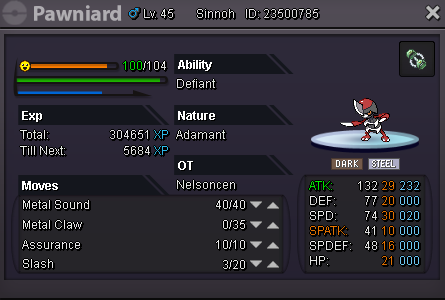
  5. There is a npc called cronky who was asking for a klefki since there is no cancel option i selected the first poke that i saw hoping to be cancelled like digs one and then it took my bishard =( All happen when steven (Npc) told me to investigate to able to enter the cave and fight Steven Boss. there is a pre evo of my bishard if that help.
Account

Navigation

Search

Search

Configure browser push notifications

Chrome (Android)
  1. Tap the lock icon next to the address bar.
  2. Tap Permissions → Notifications.
  3. Adjust your preference.
Chrome (Desktop)
  1. Click the padlock icon in the address bar.
  2. Select Site settings.
  3. Find Notifications and adjust your preference.