




New Trade Zone
Trade Zone is now live
Use the new Trade Zone for auctions and instant-price trades so Pokemon and item offers are easy to find.

Orekired
Registered User
-
Joined
-
Last visited
Everything posted by Orekired
-
no
-
1m2 and deal ?
-
1m ?
-
no thanks
-
left your offer pls
-
left your price (sold) (sold)
_LI.jpg.60e7b4f6e3c0d23d4d9125a6f68884ab.jpg)
.png.ee1f78a4a249787e22e076130b3cafb0.png)
.png.fafe063b4ae8b8dc5636ab593f344f6d.png)
.png.5cb06d3f081b411d362ca8d00007d0b8.png)
.png.01ab0b163778698c9564d40d8f853753.png)
.png.0bc2e978d916d6433a70b5004729045d.png)
.png.7379ba2a178f75560fce0d464ae53448.png)
.png.52fd002391b6260ce99b6b9c79a40454.png)
.png.114a6675d858b4d715c8e0d995c247c5.png)
.png.652819da3839603ebcc0a14a442f67e5.png)
.png.5478399c457ed5a03b0074a36bc774d0.png)
.png.51d0ec042715b05e28960f4c8c58489a.png)
.png.60c81173cf0dd4b322fe7451e184e6a3.png)
.png.145ca07e6c57ca624c3ed07e9a7b28c8.png)
.png.27c2c031ae418449323332582471f830.png)
.png.88de63dd452e74d5971c855f9845559b.png)
.png.bfc7cd351284628a7513577b25a72a1d.png)
.png.b6aa31054f421bd67ff5b6fff05d5735.png)
.png.0625926c3223d2b2b5892c7f3cd63c05.png)
-
-
500k 500k 1m8 180k 150k( not hp fire) 220k 450k 700k 350k 500k 180k(sold) 300k 650k 350k
.png.a93117213e1df21abaff0945ff25187a.png)
.png.7029d37c7659a3e0234e1676a4ceb6fb.png)
.png.a44f98bd968094bedeae8fe544159313.png)
.png.100ce5313339b905dd91d95460a6eed2.png)
.png.1e6e658ad11eb982f3840d60c38ac08a.png)
.png.2af6d98ec10da6645fd6ca20f64b3a66.png)
.png.88960251bccd75265e4ceeed3d4f2b7f.png)
.png.e088a5b04fa1c4ea7b064b13b4fbc351.png)
.png.25b37f36d5d020d7e5d1689ad179c6b5.png)
.png.24de6ec6c8e9f91fef8ac5e119e463ff.png)
.png.522cc2c2bc88a7be5cf9ea817b5e5d99.png)
_LI.jpg.0a3a57b8829414a7cf43199da90e38f9.jpg)
_LI.jpg.fe3f029d7be0b00f0dcdc2d4462fa997.jpg) intas 5m cc= 400k,rr=700k or can offer.
intas 5m cc= 400k,rr=700k or can offer.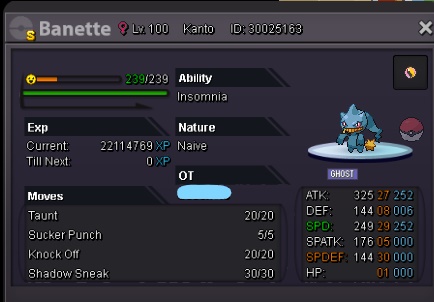 5m .... cc=450k, rr= 750k
_LI.jpg.8d092fb4f5afb64b085d351b7abd8891.jpg) 500k for scizor10 min left1m1 now
500k for scizor10 min left1m1 now.png.efa1d182b5d9707d70cd8358b4894cb5.png) wtb xmas haunter750knoted650kcc=450k, rr =750k.
wtb xmas haunter750knoted650kcc=450k, rr =750k._LI.jpg.d7a0ad2cf9b05ce9ca7d0ed10bd40f7c.jpg) sorry, that not is price i wantleft your price pls, i don't have any idea
sorry, that not is price i wantleft your price pls, i don't have any idea
.png.70a82f94e6d9f15441fde520b3f92e2a.png)
.png.08788af1b5bc8531354da42d9884b3a5.png)
.png.f180928597245da6bae04aaa7008942c.png)
.png.66bccaa5a0f91259b03c8d2848c0e131.png)
_LI.jpg.6a2c627882feaae3f72545ed3f019276.jpg)
.png.7eafd72b2ddc419fa8c3fb2020d2e484.png)
.png.9d0687db73371e4265121f196d36bcc4.png)
.png.3347ce920867dd4cf84df2b0162a559b.png)
.png.90e6e9a640669261e475efb7fb0ca3a7.png)
_LI.jpg.63a761028c9024ba07f478ac1fe49779.jpg)

.png.ae82613b598450791cfe3ee6a22ea2b0.png)
.png.9a095cce03984692fd3317c282fbe6cd.png)
_LI.jpg.6942b6565d2ca58aeb0622df7873269f.jpg)
.png.a008bbf20735c51d1fd6dacb2350b063.png)
.png.9743540959e74d64838ddf723f275036.png)
.png.da0be0bf8b0a68d9fd3f803880b7bd85.png)
.png.26613cd5163ad9fb6d16faab1b7ba33c.png)
.png.88a9accc4bf84d37505dbca7593dd323.png)
.png.76687a455b653a07abd61179d1ecf595.png)
.png.bc130bfbacf6b1b0d142262e3bfb8210.png)
.png.2eb80ee0dc34ba45dd493a7c754a6926.png)
.png.5b8210ec665df4a201c6096e45178b19.png)
_LI.jpg.c8c28f49f126068890f81dce5a50b66d.jpg)
Account
Navigation
Search
Configure browser push notifications
Chrome (Android)
- Tap the lock icon next to the address bar.
- Tap Permissions → Notifications.
- Adjust your preference.
Chrome (Desktop)
- Click the padlock icon in the address bar.
- Select Site settings.
- Find Notifications and adjust your preference.
Safari (iOS 16.4+)
- Ensure the site is installed via Add to Home Screen.
- Open Settings App → Notifications.
- Find your app name and adjust your preference.
Safari (macOS)
- Go to Safari → Preferences.
- Click the Websites tab.
- Select Notifications in the sidebar.
- Find this website and adjust your preference.
Edge (Android)
- Tap the lock icon next to the address bar.
- Tap Permissions.
- Find Notifications and adjust your preference.
Edge (Desktop)
- Click the padlock icon in the address bar.
- Click Permissions for this site.
- Find Notifications and adjust your preference.
Firefox (Android)
- Go to Settings → Site permissions.
- Tap Notifications.
- Find this site in the list and adjust your preference.
Firefox (Desktop)
- Open Firefox Settings.
- Search for Notifications.
- Find this site in the list and adjust your preference.