




New Trade Zone
Trade Zone is now live
Use the new Trade Zone for auctions and instant-price trades so Pokemon and item offers are easy to find.

Spcnelson1126
Registered User
-
Joined
-
Last visited
-
this is what i keep getting
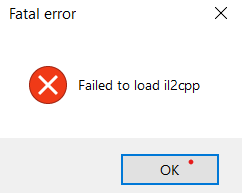
-
I can't seem to get my client to work with my computer. Any way to help with this? It keeps saying that ".dll" isn't an able to run. How do I get the client so its playable?
-
works now thanks
-
okay thanks for all your help
-
Can anyone help me with this? No matter what i do my client wont load passed validating content. I'm about out of options, any help would be greatly appreciated.
-
its been loading for 12 hours.. i really dont think its going to load
-
this is my computer properties. i know the client should work on my computer im just confused to why its not loading.
.thumb.png.9cc5f352b0937f20bd4ed5c2b5f53463.png)
-
heres my computers properties
-
x64 bit
-
is there anyway to download a .java client or able to make one? those seem to work best on this computer for some odd reason
-
nothing is working
-
nothings working.. i don't know what to try
-
I am trying it now, ill let you know if it works
-
everything was working fine a few days ago. but this keeps happening
.thumb.png.84dcbf0b9734d1bf20c1b4bf464b69d9.png)
-
ive downloaded from all three links and none of them are working
.png.b3fb23e02b435389927ecb528de55ffd.png)
.png.6e4922ac8322b47052a8c5cc650e04a1.png)