




New Trade Zone
Trade Zone is now live
Use the new Trade Zone for auctions and instant-price trades so Pokemon and item offers are easy to find.

Olocomeu
Suspended
-
Joined
-
Last visited
Everything posted by Olocomeu
-
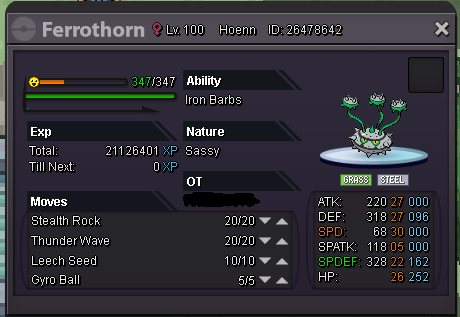
Start - 700k Insta -1,5m -Auction ends in 24h of first bid -Fake offers will not be tolerated -Min bid raise -50k
-
now it's working normally thanks
-
I can not use the teleport of hoenn and sinnoh, I completed the quest a long time, this problem began when I entered in new malville to face lt.surge after it leaves new malville I could not use the teleport the message that appears and as if I do not had completed the quest or was not a champion. sorry for the english, google translator
-
I can not use the teleport of hoenn and sinnoh, I completed the quest a long time, this problem began when I entered in new malville to face lt.surge after it leaves new malville I could not use the teleport the message that appears and as if I do not had completed the quest or was not a champion. sorry for the english, google translator
-
-
Thank you, it worked
-
I know but my gligar is lvl 100, what do you do in this situation?
-
could kindly reduce the gligar lvl by 1 so I can evolve. thanks for listening. Image OD: olocomeu
