




New Trade Zone
Trade Zone is now live
Use the new Trade Zone for auctions and instant-price trades so Pokemon and item offers are easy to find.

Nishaa
Registered User
-
Joined
-
Last visited
Everything posted by Nishaa
-
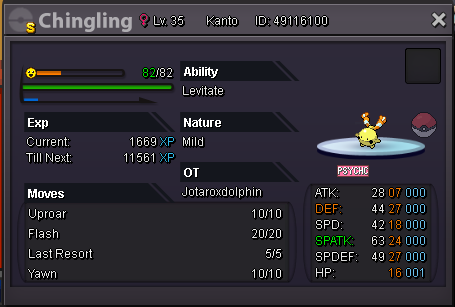
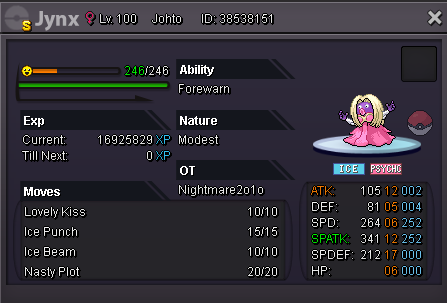
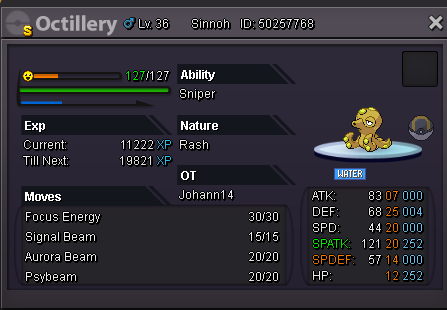
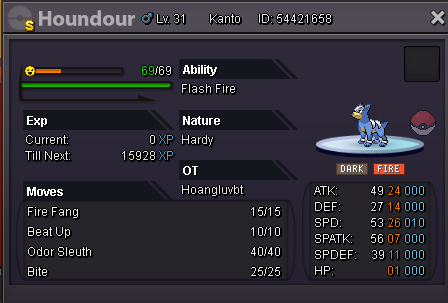
Shiny Qwilfish sold to Rnvd99 for 9 ccAuction ended, Sarks winsNoHi, welcome to my shiny shop 🙂 Accepted payment methods are Pokedollars, cc=400k, IV Reroll=700k, Nature Reroll=350k, Masterball=50k I have no plans to move to Gold Server, so we have to trade in Silver. My Discord is Maurotedesco#4241 Raichu H.P. Ice - SOLD Exeggcute - SOLD Volbeat - SOLD Kricketune - SOLD Spinda - SOLD Tentacruel - SOLD Rapidash - SOLD Steelix - SOLD Rhyperior - SOLD Corsola - SOLD Lumineon - SOLD Slaking - SOLD Donphan - SOLD Chingling - SOLD Jynx H.P. Fire - SOLD Octillery - SOLD Tauros - SOLD Solrock - 1.5m Lunatone - SOLD Qwilfish - SOLD Magmortar - SOLD Manectric - SOLD Sawsbuck - SOLD
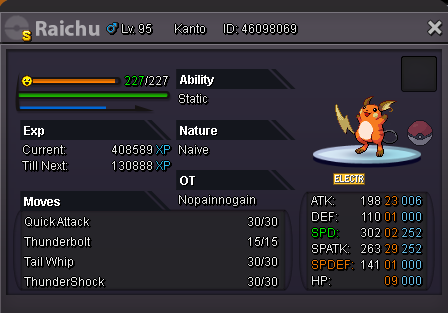

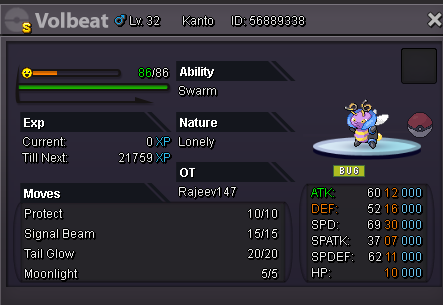


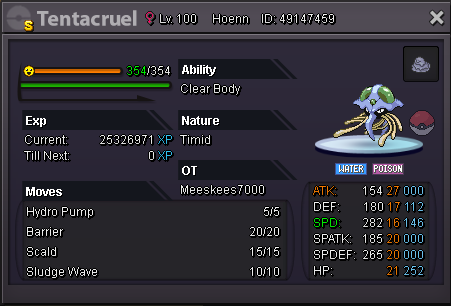
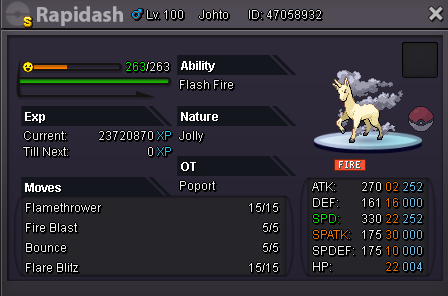
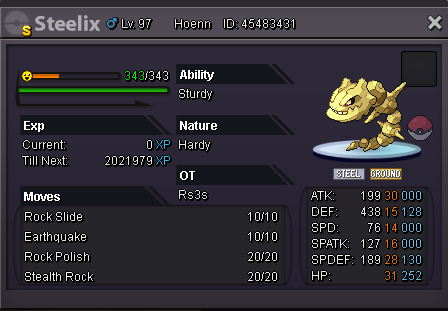

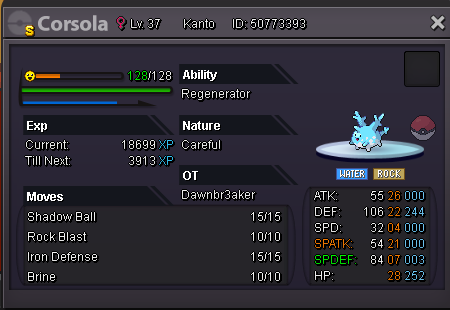
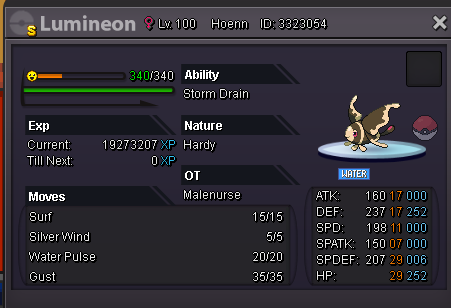

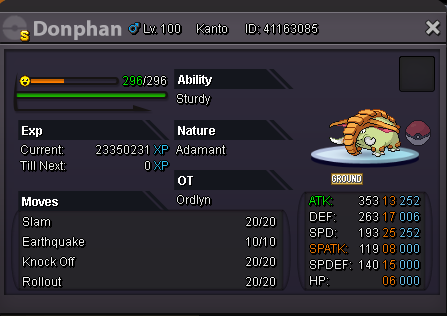


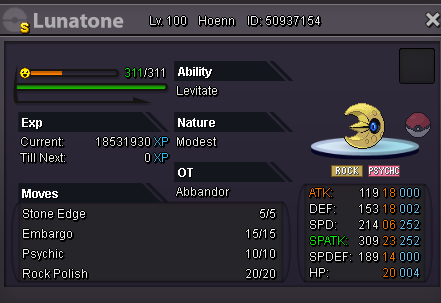
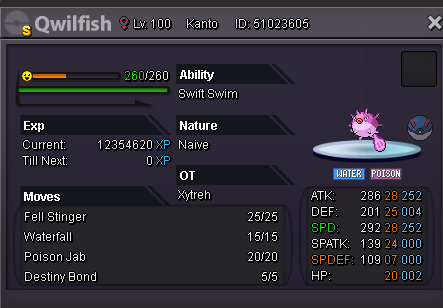


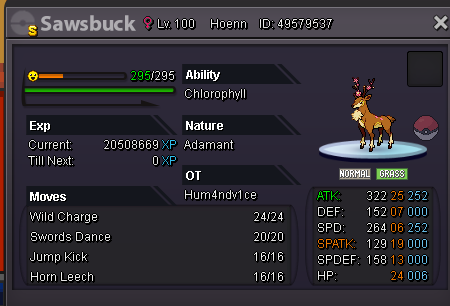 bumpbumpHi, I'm selling Shiny H.A. +ATK Dragonite (Choice Band Set) S.O. : 15m Duration: the auction ends in 3 days after the S.O. is met No Insta Price Available payments: cc=400k iv reroll=700k nature reroll=350k Minimum raise: 500k
.png.51e5028a99219084cef7d76a840f73a2.png) I am online nownice! See you laterOk, now I can so if you could log in it would be perfect. Otherwise i'll be ingame in like 5 hours (after dinner) 🙂Hi, did I win?2.5m
I am online nownice! See you laterOk, now I can so if you could log in it would be perfect. Otherwise i'll be ingame in like 5 hours (after dinner) 🙂Hi, did I win?2.5mAccount
Navigation
Search
Configure browser push notifications
Chrome (Android)
- Tap the lock icon next to the address bar.
- Tap Permissions → Notifications.
- Adjust your preference.
Chrome (Desktop)
- Click the padlock icon in the address bar.
- Select Site settings.
- Find Notifications and adjust your preference.
Safari (iOS 16.4+)
- Ensure the site is installed via Add to Home Screen.
- Open Settings App → Notifications.
- Find your app name and adjust your preference.
Safari (macOS)
- Go to Safari → Preferences.
- Click the Websites tab.
- Select Notifications in the sidebar.
- Find this website and adjust your preference.
Edge (Android)
- Tap the lock icon next to the address bar.
- Tap Permissions.
- Find Notifications and adjust your preference.
Edge (Desktop)
- Click the padlock icon in the address bar.
- Click Permissions for this site.
- Find Notifications and adjust your preference.
Firefox (Android)
- Go to Settings → Site permissions.
- Tap Notifications.
- Find this site in the list and adjust your preference.
Firefox (Desktop)
- Open Firefox Settings.
- Search for Notifications.
- Find this site in the list and adjust your preference.
.png.dd273eeae97a0c3a67e2d95ad998d036.png)
.png.71f8f7906d9bdcbd0f9b2fd2ee778e59.png)
.png.7ad22bff6dd15fb8e4fc0e931762b71c.png)
.png.638b492582a04d665ff2e701167b83b6.png)
.png.8bafd83719fd90753eaa95db1109b41e.png)
.png.b5e8cd846d0895377b12f8fecfcfae9f.png)
.png.d19032d23f9b5f4fff2994d7c302dab3.png)
.png.ac0242733e5582913e3e357e1e60c770.png)
.png.04555877b80b2880aed67f2131016112.png)
.png.37b0cddb865e560a477bfe7aeae86977.png)
.png.da546924d9947c6f156622bc762fdfc7.png)
.png.c0fe99d1bbbcd516938b2342b4d52bb1.png)
.png.e8306e2f9d96e524e8276ad3296d6072.png)