-
(sold)auction epic carefull gligar h.a max 31 spdef 30 pseed (21+ivs)
2m1
-
Jabeds EEVEE Shop - (H.A. and Non H.A.) // Lowered Prices!
i want to buy the 27 atk ada
-
Jabeds EEVEE Shop - (H.A. and Non H.A.) // Lowered Prices!
still selling?
-
eevee 31speed 21sp.atk hp ice = insane jolteon
still open? 500k
-
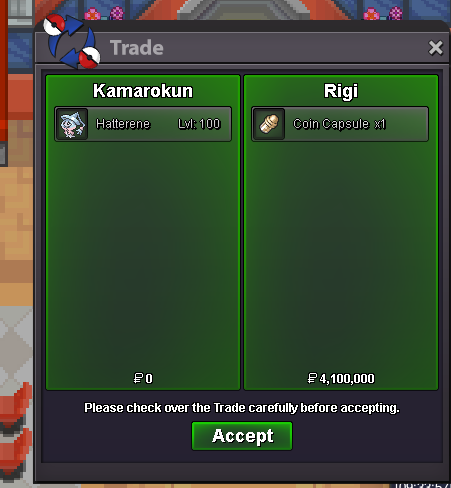
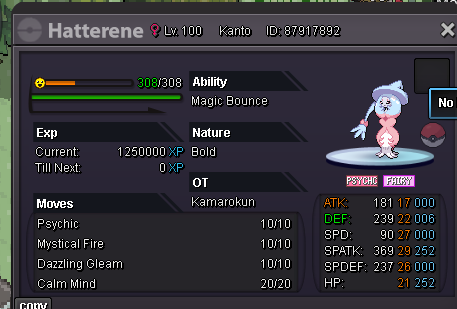
auction epic hatterene
-
auction epic hatterene
-
auction epic hatterene
- WTB h.a sneasler for pvp
-
31x2 atk speed mold breaker tinkatink (offer)
how
-
31x2 atk speed mold breaker tinkatink (offer)
ig : kamarokun discord : lunarbymyside
-
31x2 atk speed mold breaker tinkatink (offer)
- Keita/Shinohara's XMAS Giveaway [Day 1]
Kamarokun, Gold GL all and thank you- WTS cheap teddiursa
- WTS cheap teddiursa
Account
Navigation
Search
Configure browser push notifications
Chrome (Android)
- Tap the lock icon next to the address bar.
- Tap Permissions → Notifications.
- Adjust your preference.
Chrome (Desktop)
- Click the padlock icon in the address bar.
- Select Site settings.
- Find Notifications and adjust your preference.
Safari (iOS 16.4+)
- Ensure the site is installed via Add to Home Screen.
- Open Settings App → Notifications.
- Find your app name and adjust your preference.
Safari (macOS)
- Go to Safari → Preferences.
- Click the Websites tab.
- Select Notifications in the sidebar.
- Find this website and adjust your preference.
Edge (Android)
- Tap the lock icon next to the address bar.
- Tap Permissions.
- Find Notifications and adjust your preference.
Edge (Desktop)
- Click the padlock icon in the address bar.
- Click Permissions for this site.
- Find Notifications and adjust your preference.
Firefox (Android)
- Go to Settings → Site permissions.
- Tap Notifications.
- Find this site in the list and adjust your preference.
Firefox (Desktop)
- Open Firefox Settings.
- Search for Notifications.
- Find this site in the list and adjust your preference.