Skip to content
View in the app

A better way to browse. Learn more.

Pokemon Revolution Online

A full-screen app on your home screen with push notifications, badges and more.

To install this app on iOS and iPadOS
  1. Tap the Share icon in Safari
  2. Scroll the menu and tap Add to Home Screen.
  3. Tap Add in the top-right corner.
To install this app on Android
  1. Tap the 3-dot menu (⋮) in the top-right corner of the browser.
  2. Tap Add to Home screen or Install app.
  3. Confirm by tapping Install.

Luniee

Registered User
  • Joined

  • Last visited

  1. Beverr started following Luniee
  2. Luniee changed their profile photo
  3. Luniee started following Adhdennie
  4. 1. What's your Player name (IGN)? EnderGirl7 2. Number of hours played? 552 hours (as of posting this) 3. What's your favorite Pokemon? Tangela 4. What do you enjoy doing the most in PRO? catching pokemons and raising them 5. Screenshot of your Trainer Card 6. How long have you been playing Pokemon? since i was very small. 😛 7. Favorite ice cream flavor. Butterscotch
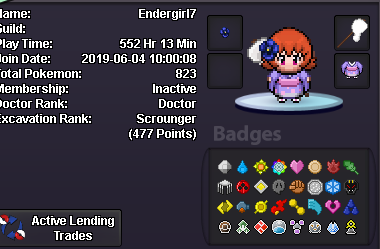
  5. hi! i would like to join the guild ign: EnderGirl7 discord: agumai4774
  6. Can I join pls

Account

Navigation

Search

Search

Configure browser push notifications

Chrome (Android)
  1. Tap the lock icon next to the address bar.
  2. Tap Permissions → Notifications.
  3. Adjust your preference.
Chrome (Desktop)
  1. Click the padlock icon in the address bar.
  2. Select Site settings.
  3. Find Notifications and adjust your preference.