




New Trade Zone
Trade Zone is now live
Use the new Trade Zone for auctions and instant-price trades so Pokemon and item offers are easy to find.

Kosmopolitaine
Registered User
-
Joined
-
Last visited
Everything posted by Kosmopolitaine
-
Trave evolution request In-game name: Kosmopolitaine Server: Silver Timezone: GMT+1 I'd like to evolve my Haunter asap. I'm available from now until 5 PM GMT+1. Thanks!
-
Thanks!
-
Randomly came across and caught this shiny male Nidoran, wondering what it would be worth as it is since I won't be using it
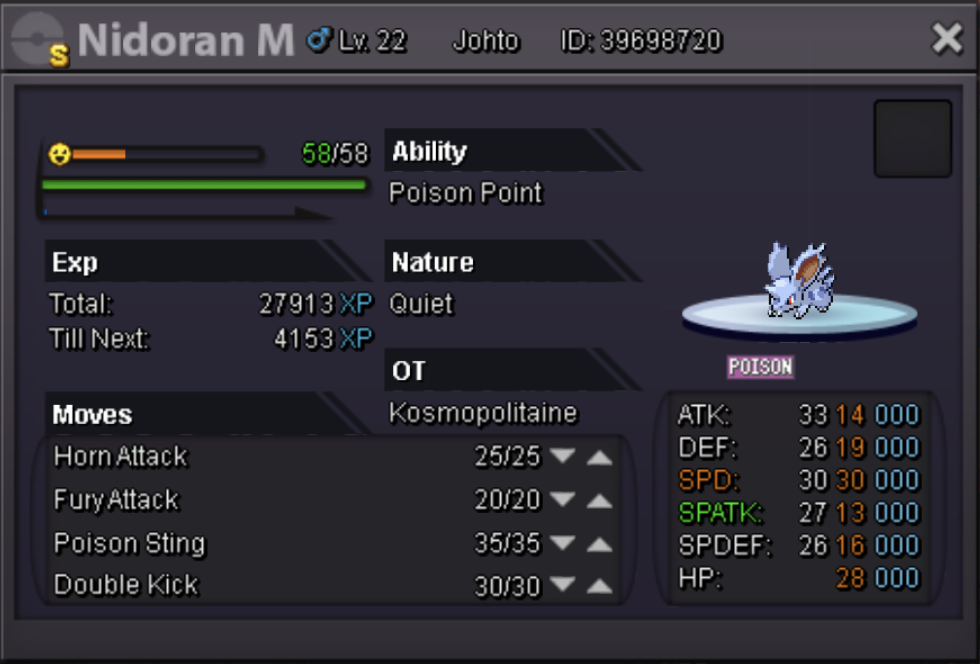
-
Please let me know if you received the TM Ice Beam and / or if you continue to have issues or concerns regarding this issue. ~ TrollDaddy Thanks a lot for the prompt response and for the TM, which I have received in the mailbox! It is kind of important for me ahead of the Elite Four, since I have no other ice moves in my roster. ;)
-
I was just on the Victory Road training for the Kanto Elite Four and checking my TMs, trying to see what I could use on my pokemon. I had Ice Beam in my bag, but when I went back to use it a few hours later, it was gone. I haven't taught it to any of my pokemon and certainly have not deleted it on purpose (I've never deleted any item). Is it possible it just disappeared in some sort of glitch?